New Capabilities & Feature Improvements
AI
Starting with the this release, the Encodify platform will incorporate Generative AI capabilities, such as platform assistants, to enhance core functionality and user workflows. These enhancements are fully governed by your existing agreements, meaning no supplementary contractual addendums are required. Your data is processed transiently and is strictly not used to train, retrain, or fine-tune any foundational AI models. While these services are enabled by default, customers may optionally choose to opt out before their environment update. For comprehensive details regarding data security and compliance, please refer to the full document available at http://trust.encodify.com.
AI Comment Summarisation
The AI-assisted summary is designed to help users quickly extract all relevant, comprehensive, and actionable information from long comment threads and review processes. This feature allows users to rapidly understand the conversation context and identify action items, ultimately driving projects forward. It is designed to enhance content digestion, especially for lengthy threads or media-heavy files (PDFs, Videos, and Audio). This functionality is present in the Item Comments Panel and in Proofing, as the new Summary tab.
AI Writing Assistant
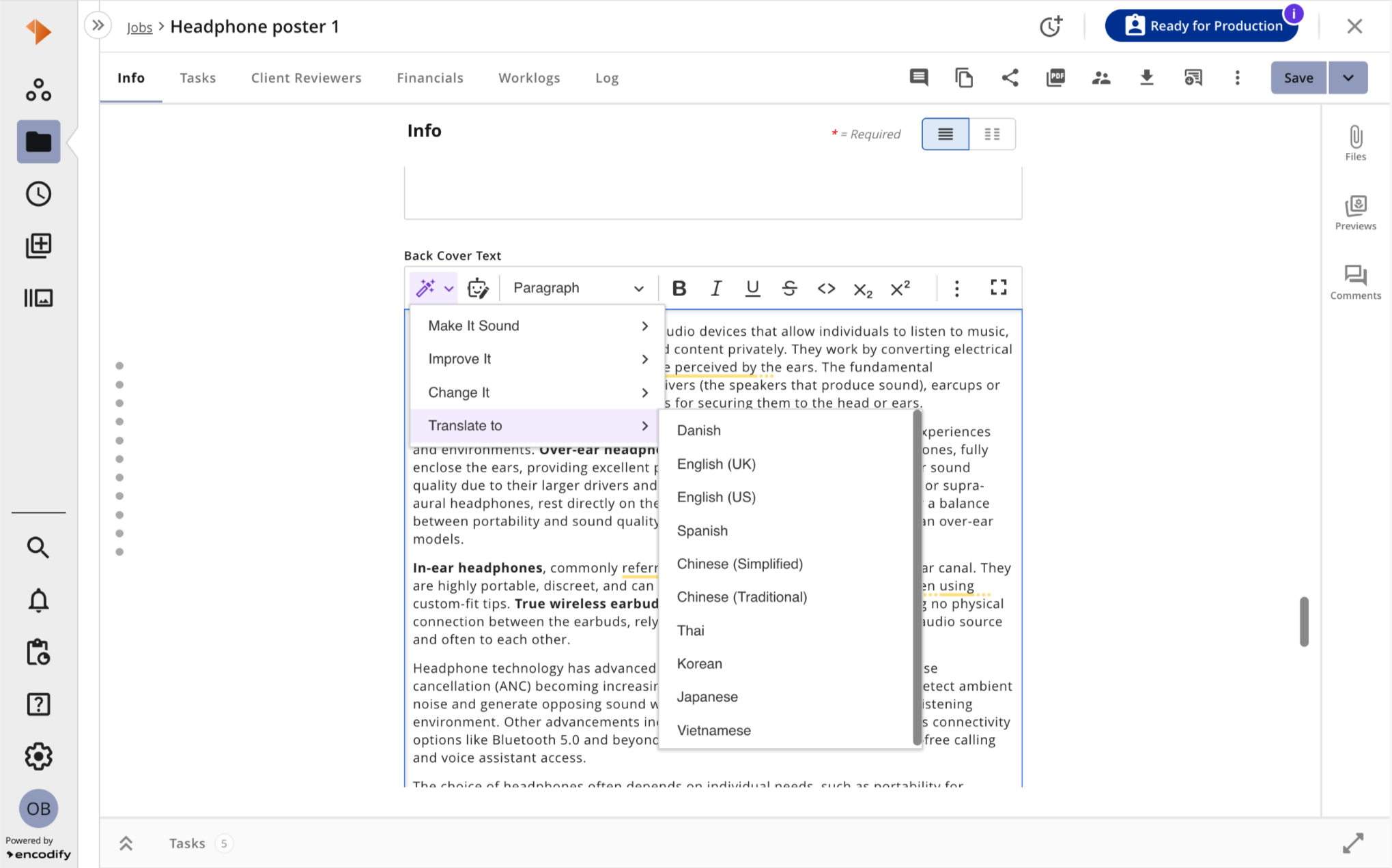
AI-assisted writing is integrated across the platform, accessible in all rich text fields and in tools for commenting and messaging, like item comments and annotations in Proofing. This assistant enables users to refine their text content—such as adjusting tone-of-voice, correcting spelling, expanding or shortening passages, and translating to supported languages—all without leaving the platform.
Multimodal AI Assessment Rule
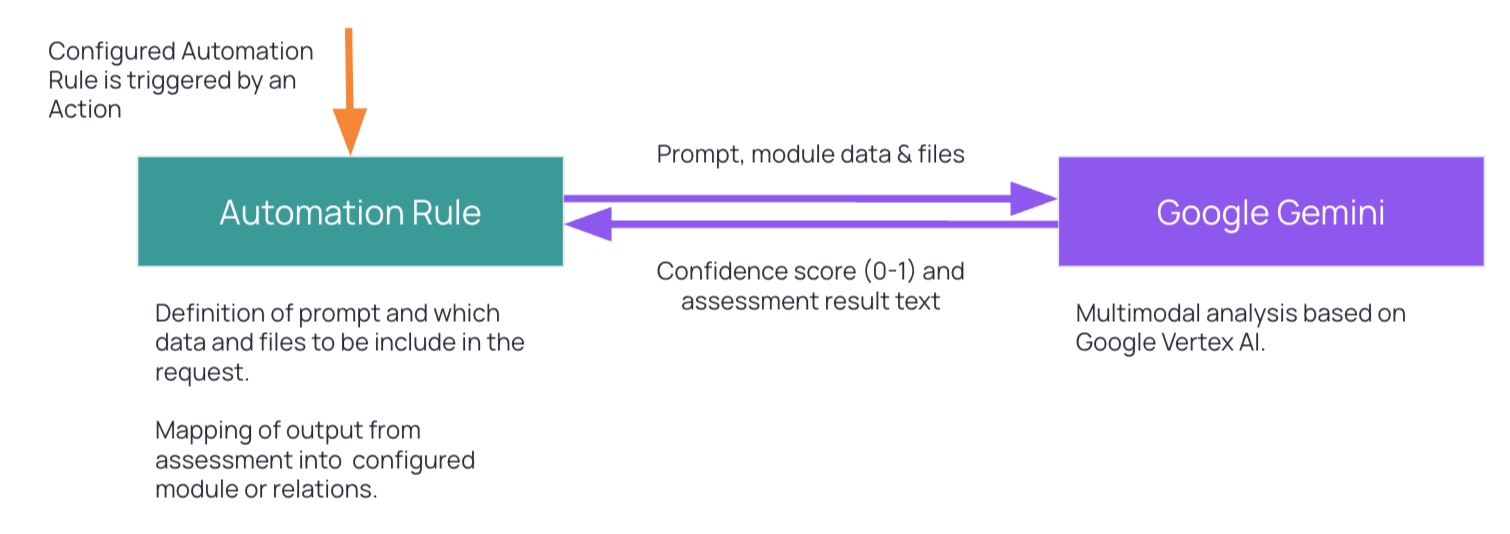
The new Automation Rule facilitates the analysis of data and managed files as an integral component of solution logic, such as compliance assessments. This feature incorporates a custom prompt based on Google Gemini, empowering citizen developers to specify the nature of the analysis to be conducted. Data and files can be sourced from a configured module and its immediate relations, yielding a confidence score and assessment text in return. Example applications include evaluating product compliance with general legislation and market demand, as well as conducting brand guideline checks.
Note: The Multimodal AI Assessment Automation Rule is licensed as an add-on, available to Professional & Enterprise package subscribers.
Apps
Reporting Tool App
The Reporting Tool configuration has moved and is now enabled from the Apps Library. The reports will continue to function as they always have, but the settings are updated and modernised.
Time Tracking (Hours)
The time management solutions in Encodify are under transformation, and to adapt to the improvements and new functionality, the Hours App is now renamed to “Time Tracking.”
Time Spent x Estimated: It provides a clear way to understand how logged time compares to planned effort. It allows users to quickly see whether work is progressing within the expected estimate or exceeding it, helping improve time tracking accuracy and decision-making.
This feature is available in both Timesheets and the Record Time Callout (from the item), and allows you to verify effort at Project, Job, and Task levels, with dynamic UI updates and detailed tooltips.
New configuration options: In the February’26 release, new properties were introduced to the Time Tracking App, allowing a more flexible configuration and usage of Recording Time and adding time entries. To keep advancing the time tracking capabilities, we have added to the configuration of the app three additional optional field mappings.
Estimation: A field with the time estimation of how long the work will take to complete. It is used to compare with the time logged (spent). It can be mapped in all three levels (Project, Job, and Task).
Assignee: Field with item assignee, used to show items in the Timesheet that users are assigned to, before time is logged for the current period. It can be mapped in all three levels (Project, Job, and Task). Note: the field mapping can already be adjusted in version 24.7.0, but the full functionality is not available in the current release.
Worklog Description: Field containing description, comment or message about the time entry, so the additional information is available from the Timesheets, Record Time Callout Panel, etc. Note: the field mapping can already be adjusted in version 24.7.0, but the full functionality is not available in the current release.
Apps Logs
System Change Logs: All modifications made to the Apps through the Apps Library are now documented in the System Change Logs, enhancing the traceability and auditing of alterations made in the configuration of these extensions.
Automation Rules
PDF Generation from XSLT Templates
It automates the creation of PDFs based on pre-configured print templates (XSLT). When the rule’s conditions are met, the generated PDF is automatically saved to a specified file field. The rule can be triggered by status transitions across various contexts, including item view, bulk status updates, and transitions within the proofing view.
Connected Services
The Connected Services are in a new location and can now be accessed and configured from
Sidebar → Configuration → Connected Services. All connected services will continue to function as they always have, but the settings are updated and modernised.
Item Views
The updated Activity tab in the item view offers a consolidated overview of all modifications made to the item — encompassing changes to fields, actions performed on the item (such as creating, updating, inactivating, or reactivating the item), triggered events (like actions, imports, automation rules) and their specifics. Each record indicates who implemented the change, when it took place, and what information was altered.
In addition to presenting field changes in a more accessible manner, it facilitates tracking the sequence of events associated with a field update and provides essential details for troubleshooting. The filtering options simplify the process of locating specific records.
Note: In order to use the new Activity tab, a migration must be carried out. Please refer to the article Switching to Activity Log on UI.
Autofill Support
Item fields now support Chrome’s autofill for faster data entry.
Copy with Default Values
This new property allows default rules and field dependencies to be applied when copying items, similar to item creation. When enabled, the system determines field values using a defined priority order to ensure predictable results during item copying.
This option is disabled by default. When disabled, copy behaviour remains unchanged.
Export PDF
Besides facilitating the creation of PDFs from XSLT templates during workflow transitions, this version also includes changes to the manual PDF export feature. By selecting the button to manually export PDF (found in both the module view action ellipsis and the item view toolbar), users are now given a dropdown menu to choose from. This enables a swift choice between downloading and saving to the current item, without the need to preview it first, though that is still available as an option. To improve efficiency, this process is now handled as a background job, allowing users to continue working and managing other tasks while the operation is carried out. The reasoning behind converting this process into a background job is that it is the most effective way to ensure robust execution and avoid any potential timeouts during content generation when dealing with large datasets.
Files Panel
Files Tab: Added file count badges to the Files panel in item views.
File Panel Preferences: User preferences for file panel size are now saved correctly.
Navigation
Browser Tab Titles
Dynamic page titles for improved navigation and multi-tab workflows.
Configurable "Contact Support" Button
Admins can now set a custom URL and label for the "Contact Support" button in the Resource Centre, improving flexibility for enterprise clients
Module Views in Advanced Search & Creative Automation
Unified view selector and improved user preferences for module views in advanced search and creative automation
Side Navigation > Configuration
The side navigation for Configuration options now aligns with the other side navigation categories for a more cohesive user experience. Configuration options are now grouped, searchable, and support expand/collapse. Also, Site Configuration and System Configuration (Classic UI) now open as a new tab.
Proofing
Guest Users
The Guest User add-on has improved its functionality, enabling external users to utilise the advanced features of the Proofing tool.
Inviting Guests via Link: This new property allows inviting guest users via a shareable link in single or multi-file proofing. This way, instead of being invited via Email, the guest user can access the Proofing file by using a unique URL.
Multifile Proofing: External users can now be invited to review multiple files at once. By sharing from the Multifile Proofing Overview page, internal users can invite Guests to proofread a bundle of files.
Review: The review tool has been updated, and now external users can also be part of a review process. This process is automated, so the review items are created automatically when a guest user is invited to proofread and the property “Request Review” is enabled.
Mentions: To advance the communication during Proofing rounds, the guest users can mention internal users and be mentioned by them. For that, in the Guest User App, the user groups of external users can be configured, so they are automatically assigned when a guest is invited.
Proofing Reviewers
It provides a data-driven overview of the file review process, detailing participant engagement and approval statuses. This information has migrated from the Insights tab (which was removed) and is now displayed on a modal that can be accessed from the Comments tab (main tab) when clicking the Reviewers icon (User icon) on the tab header.
Workspaces
Calendar Widget
Users can now set a default period (day/week/month/schedule) in configuration, improving performance and customisation.
Breaking Changes
Deprecated
The unused endpoint
GET: /rest/users/{id}/groups/userswas marked as deprecated. It will be deleted in future versions.
Decomissioned
Validation Email: Removed legacy user validation email feature and cleaned up related configuration.
Input Mask Migration: Decommissioned "User-defined input mask" and migrated existing validations to Regexp.
Removed the deprecated Creative Automation Studio via StoryTeq app and related services.
Perfomance & Architecture
SUMIF DSL
Introduction of
sumifdsl()for faster, more efficient calculations, reducing system load and improving performance for complex data operations.
Database upgrade: Changes in the database to increase the maximum allowed character length of comments.
Bug Fixes
General Bug Fixes
Resolved inconsistent comment behaviour on status transitions.
Addressed widget formatting rules leaking to module views.
Fixed issues with status fields not linked to workflows displaying incorrect formatting.
Corrected item creation, bypassing required field validations.
Improved filter behaviour for anonymised users.
The save button now enables immediately after uploading the required files, fixing UI validation issues.
Sidebar now correctly fetches and displays user profile pictures, improving personalisation.
Fixed Apps configuration issues after module inactivation.
Restored the capacity to delete files from the Briefing System.
Decimal calculations formatted as hours now display correctly for users without edit access to module.
Field Conversion: Prevented internal server errors when rules reference converted fields.
Prevent unnecessary module reindexing when fields are deleted, and optimise the fetching of reference fields.
In the Actions overview, the target URLs information for "Copy to HTTP" actions was restored.
Added a maintenance script to verify and fix eventually broken app templates, improving system reliability.
Firefox: Fixed “Oops” error in Firefox when batch commenting on audio files in multi-file proofing.
Fixed the inability to update connected accounts and improved error messaging for account deletion.
Hardened calculation field rendering to prevent HTML injection and enforce disabled formatting.
Fixed navigation bug where the wrong view was opened after bulk item changes with filters applied.
Corrected syntax issues when copying actions from Encode Template to Velocity, ensuring accurate migration.
Fixed an infinite recursion issue in FTP import when servers return
.and..directory entries; added depth limiting to prevent symlink cycles.Fixed File Output Name evaluation edge case so Velocity expressions like
$CurrentItem.fieldValue('New name')work correctly (evaluation no longer broken by file extension handling).Background jobs fix to correctly execute under SystemUser.
Added validation to avoid the usage of inactive modules in Comment Attachments - Filters out inactive modules from attachment configuration and blocks inactivation when referenced by Proofing/Comments configuration.
Proofing
Improved annotation colour consistency, batch comment handling, and access right colour updates in multi-file proofing.
Fixed content loading for ZIP/JSON file types in proofing view, resolving infinite loading.
Standardised the data cleanup process to ensure that delete operations consistently synchronise with proofing files and version history.
A fix to ensure correct annotation colour for guest users.
HTML Proofing: Fixed empty comment panel appearing on version switch
Comment attachments: The attachments module option now uses the correctly configured module name instead of a static label.
Resolved issues with proofing tool hotkeys and annotation behaviour in read-only mode, when adding batch comments (Multi-file Proofing).
Improved proofing comment colour panel visibility (Access Rights selector) and scroll behaviour.
Firefox: Access right colour and annotation icon now always displays in the audio proofing toolbar.
Proofing annotations no longer fail when Reviewer Version mapping is missing/misconfigured.
Fixed URL Manipulation to prevent guest users from accessing non-shared items by editing the URL.
Restored in-product navigation path back to Multi-file Proofing when accessing a single proofing file (particularly important for external users to avoid “close → logout” dead ends).
Dark Mode
Dark mode preference syncs across tabs, improved modal sizing, and consistent badge and theme colours.
Resolved issue where proofing comment reply editor would revert to white background after collapsing replies.
Aligned link colours in the UI for better theme consistency, including specific adjustments for light/dark modes and name fields.
Time Tracking (Hours App)
Record Time button now updates correctly after logging time.
Corrected total column calculation in the Hours app and improved error handling for negative durations.
Resolved issue where timers could not be stopped if the "is running" field had unexpected values.
Starting a timer with a pre-set duration now reflects the pre-set time correctly (instead of starting from 0).
User Accesses & Permissions
Fixed issue where guest users could not be deactivated from the User Management list if they had multiple shared resources.
Updating users via System Configuration no longer resets their preference settings.
API users can now access Swagger and ReDoc documentation without requiring admin rights, resolving previous permission issues.