New Capabilities & Feature Improvements
Automation Rules
Notification Rules: Mention
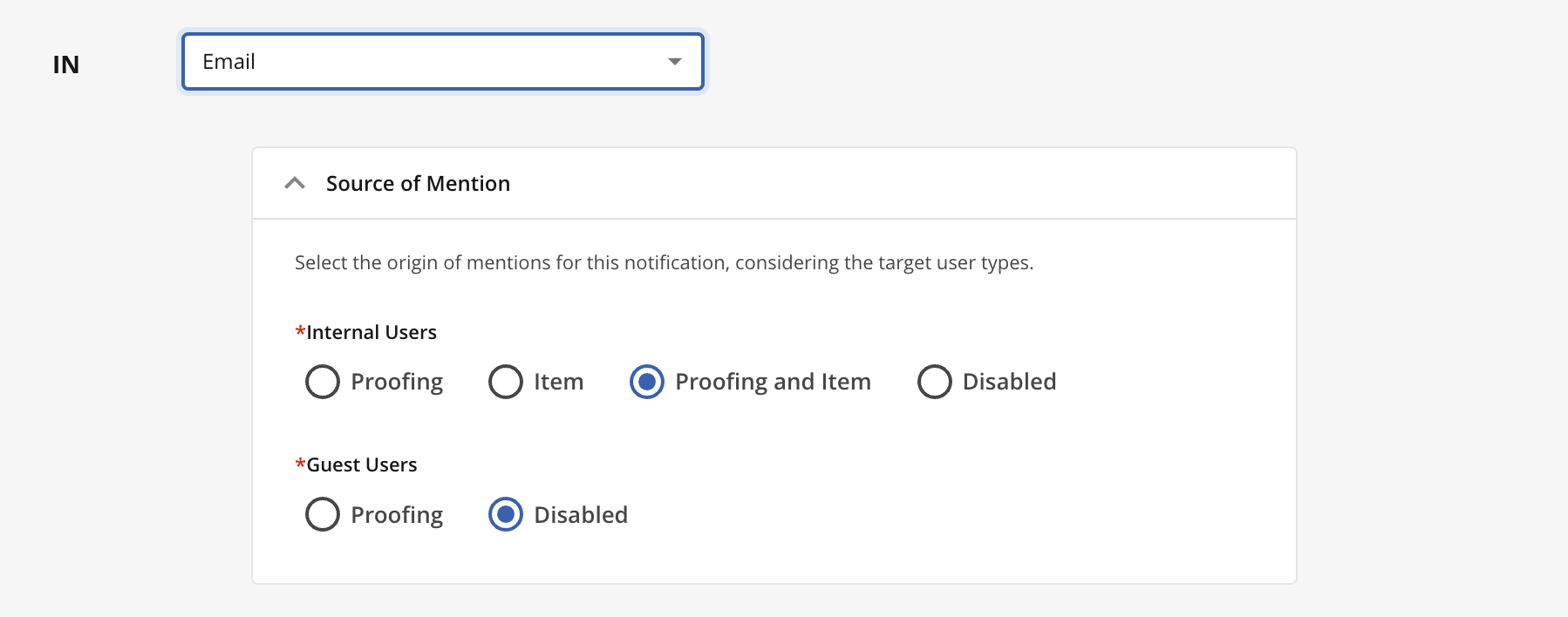
Source of Mention: We have enhanced the configuration of the notification rule subtype 'Mention' to more effectively cater to varied notification requirements. The updated feature enables the precise identification of the mention source that will activate the notification rule, distinguishing between sources relevant to internal users and those applicable to guests. This approach allows for not only the specification of the origin, like mentions done in Proofing or Item Comments, but also the identification of the recipients of this notification.
AI-based Rules
Support default values when creating inline items: AI rules configured to "Create inline item" now correctly populate all parent-dependent fields, ensuring full feature parity with manual UI creation.
Proofing
Compare View
Sync Navigation: In this release, we introduce changes to the bottom Proofing toolbar. When Sync Mode is on for PDF/Office documents, a zoom and pagination toolbar appears at the bottom. The toolbar has a drag handle. When active, zoom and page navigation are hidden, allowing shared control.
Zoom — the right view leads; all zoom actions affect the right viewer, with the left matching its level.
Pagination — the right view leads; current and total pages reflect the right viewer, with the left following via scroll sync.
Time Management (Time Tracking App)
My Time
Duration Exceeds Working Hours: Implemented a confirmation dialogue alerting users when a time entry duration exceeds the working hours for the day, helping prevent unintentional over-reporting of work time. The alert respects configured working hours or schedules and applies both when entering new time entries and when saving time clocked via a timer.
“Show Assigned to Me” Items: This new feature shows items assigned to the user in My Time when a toggle is enabled in both Timesheets and Calendar, improving visibility of unrecorded time entries across Project/Job/Task modules. This enhancement ensures users can easily track their assigned tasks even when there is no logged time yet in that period, streamlining time management.
Note: The Assignee field must be configured in the Time Tracking app.
.png)
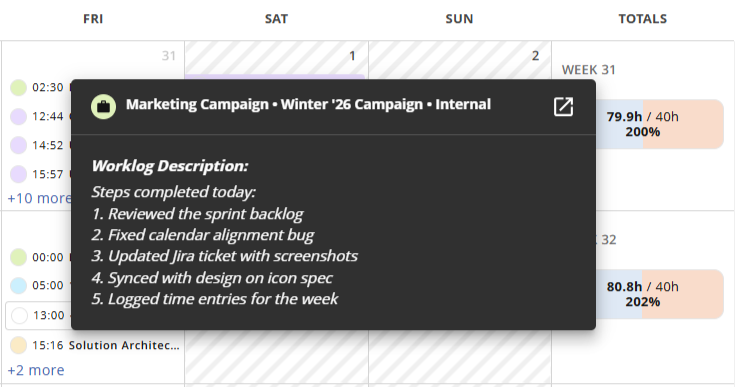
Work Log Description: Now, you can access more details of time entries directly from the Time Tracking views. By configuring the Work Log Description field in the Time Tracking App, a text input field (e.g., description, comment, message) will appear when accessing time records in the Timesheet (Record Time panel) and in the Calendar.
Workflow
Item Status Change
Dropdown list adjustments: The transition workflow status dropdown has been updated to better accomodate status with longer labels, addressing client feedback for enhanced usability.
Workflow Configuration
Migration to Configuration > Workflow: As part of a continuous effort of bringing configuration closer to where action happens, the workflow configuration has been migrated. Therefore, from this release, Workflows can be added and edited from the same place where the workflow diagrams can be viewed, avoiding the navigation between pages in order to visualise configuration. Now every new transition can be instantly seen in the graph after its creation.
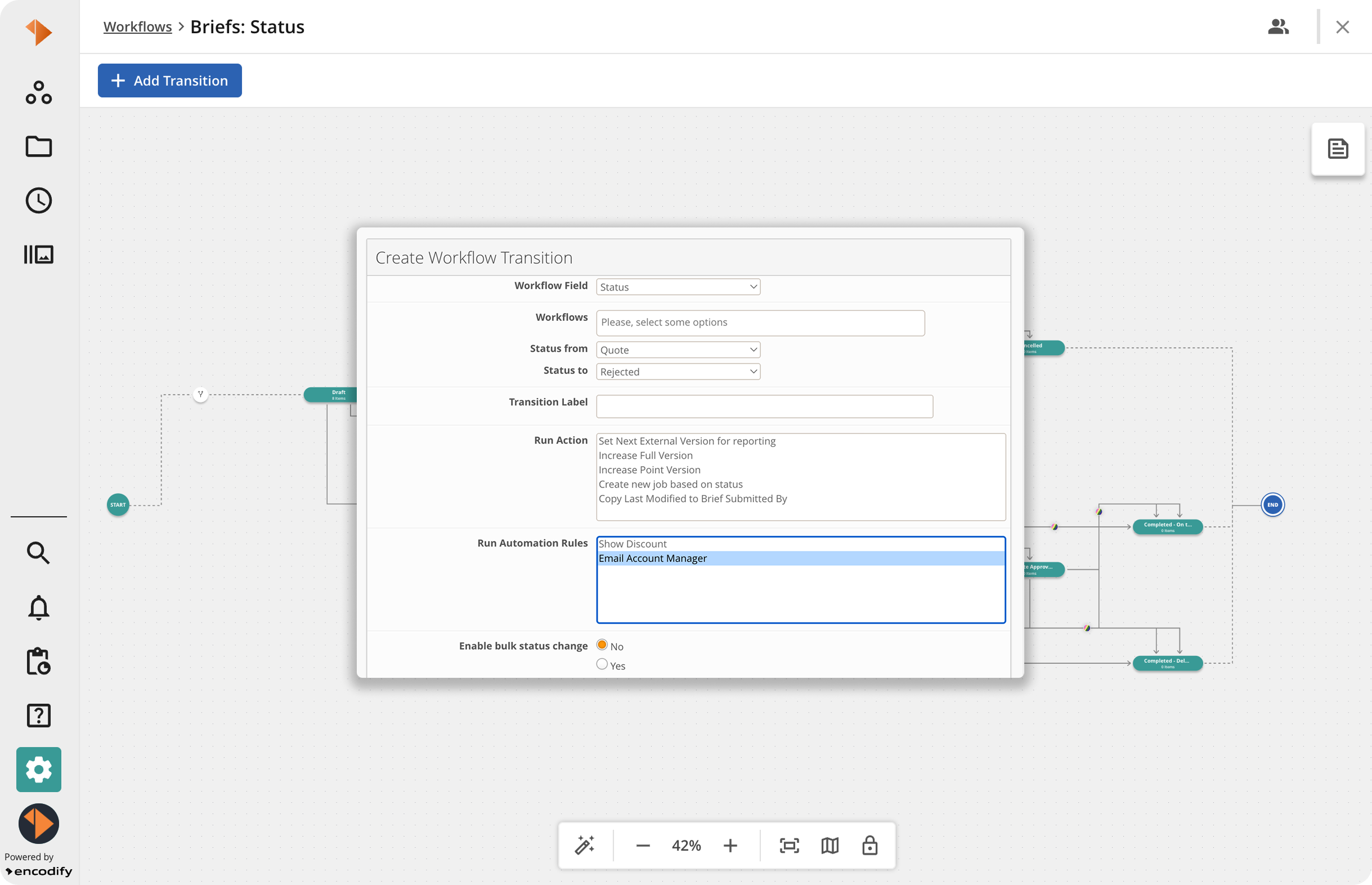
All Workflow edit settings previously available have been preserved, and in forthcoming releases, additional enhancements will be introduced to these pages to facilitate even more efficient workflow management. Stay tuned!
Workspaces
Spreadsheet Widget
Widget Actions: The behaviour of "Copy Item" in spreadsheet widgets is now aligned with the one selected for the "Add New Item" option. This change ensures consistency between item creation and copying processes, meaning that if “Form” is selected as the way to create new items in the widget, copied items will be presented the same way, improving user experience.
User Management
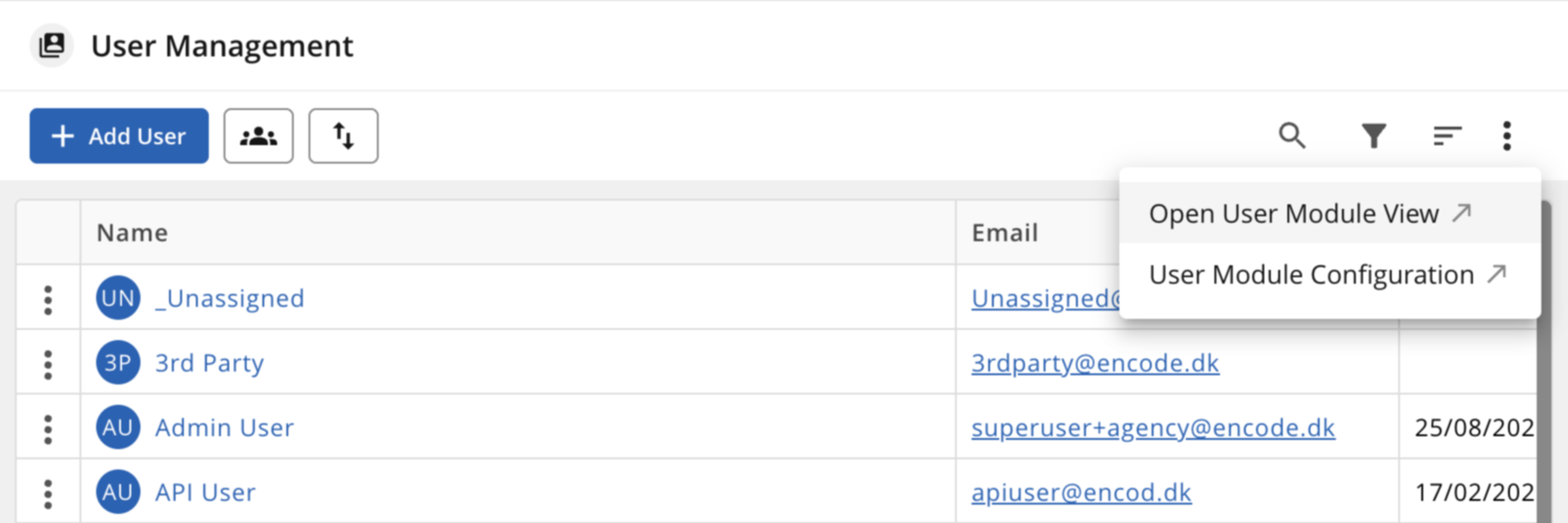
Link to User Module: Another enhancement designed to accelerate and facilitate easier access to the configuration included in this release is the direct link that allows users to open the User Module and its configuration page straight from the User Management page.
Breaking Changes
Decommissioned
Show Users in Global Search
“Show users” configuration option and corresponding section in Global Search have been removed. User name/edit link in Global Search results now redirects to the User Management user page.
Classic UI lightweight user info dialogue has been removed.
“Users” section in the Global Search window has been removed. Results for user search will be in the modules list for the User module.
Impact on Access Rights:
For listing users (find via global search): “Find users” OR “Read” access to the user management module.
For viewing user info: “Find users” AND “Read” access to the user management module. With only one of the access permissions, the user will only have access to the username.
For editing users: “Edit” for “Users” access + Edit access to the User Management module
Duplicated Widget Formatting Rules
Formatting rules for workspace widgets are no longer duplicated upon saving. Previously, saving a workspace widget with conditional formatting created a new copy of its formatting rules. These rules were listed in the module's Formatting Rules and applied to items in the module view.
Now, widget formatting rules are linked to their widget: re-saving updates rules, and removing a widget deletes them.
Cleanup on upgrade — Please read
The upgrade resolves the formatting rules associated with a widget, which will be removed from the module's Formatting Rules list but will remain active on the widget. It does not eliminate any leftover copies from previous saves, as these resemble manually created rules. They will remain in the Formatting Rules list and need to be reviewed and deleted manually, often recognisable by sharing the same name in the module.
Calculations
The calculations for
userPrintStatus(${FileField})anduserDownloadStatus(${FileField})are no longer supported and cannot be created.
Validate Target Fields in AI Extraction Rule
The toggle to control validation of target fields when populating values extracted by AI will be phased out after the upgrade. Values that were previously rejected when the toggle was enabled are now stored as the AI returned them. Data returned by AI and saved to module items is recommended to be reviewed.
Deprecated
Module Configuration via Site Configuration
In future releases, it will no longer be possible to configure modules via Site Configuration (Classic UI). All properties that are managed are being transferred to Manage Modules, Workflow and other relevant pages, and the configuration pages in Site Configuration will be phased out when all the remaining functionality is successfully migrated.
Order Basket
The property "Order Basket" present in the configuration Actions > UI Event > Ordering has been designated as deprecated in upcoming releases.
Further information regarding the discontinuation will be provided in future release notes and associated documentation. No immediate action is necessary at this time. Please reach out to feedback@encodify.com with any questions or concerns.
Performance
Implemented performance improvements for Export processes, aiming to enhance speed and efficiency.
Improved performance of search execution.
Performance optimisations for calculation fields.
Improvements in the loading performance of the Record Time panel when fetching large datasets.
Bug Fixes
Addressed an issue where the Text Fields set as “Text Box” had content truncated in spreadsheet view and could not be fully viewed despite formatting adjustments.
Fixed an issue in the Time Tracking where weekly totals incorrectly included time entries at midnight on Monday in the previous week's total.
Addressed a problem with the converter service failing to generate previews for uploaded assets.
Fixed an issue to preserve letter casing in URLs.
Restricted the field types that can be used in the 'Review version' configuration in Proofing.
Fixed an issue where new SSO users were not automatically visible in the User Management Module.
Fixed the display of the Background Jobs icon alarm badge even when the jobs queue is empty. The adjustment guarantees that the badge is shown solely for active or pending jobs that require user intervention.
Fixed an issue with the missing automatic update of the dependent fields in the time entry form.