Feature Improvements
Appearance
Dark Mode
The Encodify interface now offers users the flexibility to switch between Bright and Dark modes instantly. Dark mode is a high-contrast UI setting that inverts the standard colour scheme. This feature minimises screen glare, making it significantly easier on the eyes, especially in dim or nighttime conditions. Creative professionals and others who need to concentrate on content may find this change particularly helpful. This is a user preference, which can also be customised to follow your brand colours.
Theme Configuration: With the introduction of dark mode customisation, existing themes will have a new "Dark Mode" tab. Default colours are applied to ensure the new preference can be used from the get-go, but Admins should review and update their theme settings to ensure brand consistency and accessibility in dark mode.
Switching from Bright to Dark modes and managing the Theme colours for Dark Mode.
Appearance adjustments
We are continually refreshing, modernising, and improving the interface's accessibility through updates to styles, colours, and increased uniformity across pages. These latest enhancements are visible on toolbars in areas such as Automation Rules, Proofing, User Management, Timesheets, Bulk Copy, and Bulk Update, as well as in configuration modals, most notably the Themes configuration.
Automation Rules
Static Selection Rule
In the Action block, it is now possible to configure a custom value as the value populated in a field when the rule is triggered.
Custom values include: regular text entry, velocity templates, concatenated text or leave it empty if values should be removed from the field.
Item Views
Item View Configuration
The configuration of item views is now updated to match what the actual view is displaying. Changes include toggles for view variants (Item form only, item form + inline module, Inline modules only) and more control over the content on the Item Panel, introducing the possibility of configuring item comments visibility per view (general configuration of comments is still maintained in Site Configuration).
Note: As of this version, restrictions have been placed on configuring certain elements of the Item Panel (File Fields, Item Comments, and Activity Logs). These elements can now only be configured within views that also include an item form.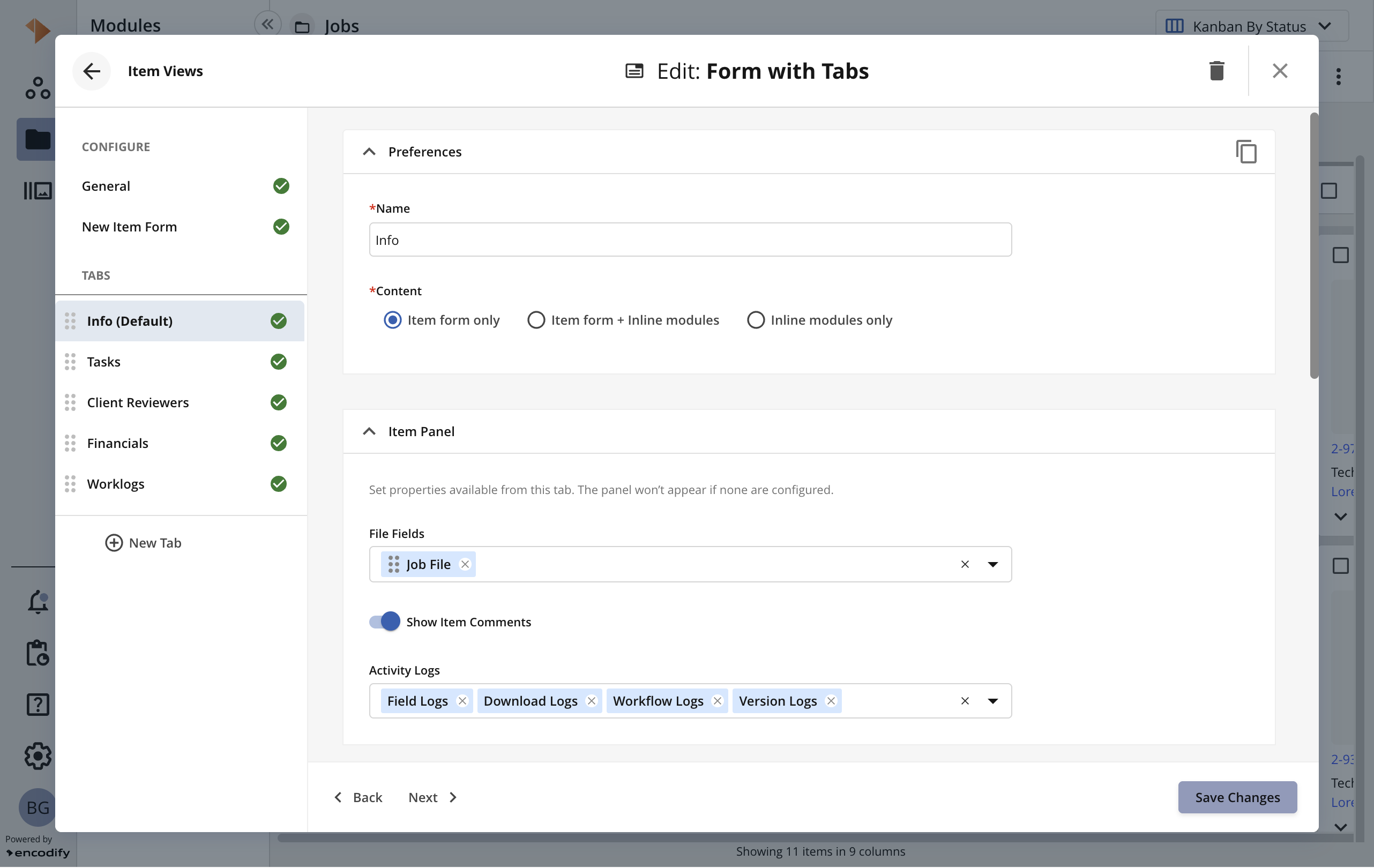
Configuration of Item Views > Form with Tabs > Info Tab
Module Views
Bulk Paste in Filters
The users can now copy multiple values from external sources (like Excel or Google Sheets) and paste them directly into a filter to select them all at once. It is supported when filtering columns (spreadsheet and split views) and from the filter panel, as long as the filter is applied to selection fields or module links.
Navigation
Modules Side Navigation
Now it is possible to customise the sort order of Modules in the side navigation by dragging and dropping them to a desired location.
Modules can be moved from one group to another and rearranged within a custom group using this method. This property is stored as a user preference.
Note: The custom sorting is not available for the generic “Modules” group, where the A to Z sort order is maintained.
Sorting of modules in the side navigation
Privacy Policy
The privacy policy experience has been updated and streamlined. The company's privacy policy (or equivalent document) is now managed and accessible through the Resource Centre. Administrators have the ability to edit the content and publish it for user acceptance. Upon their next login, users will encounter a redesigned prompt page, requiring them to review the newly published document.
Editing and publishing a Privacy Policy.
Proofing
Annotations
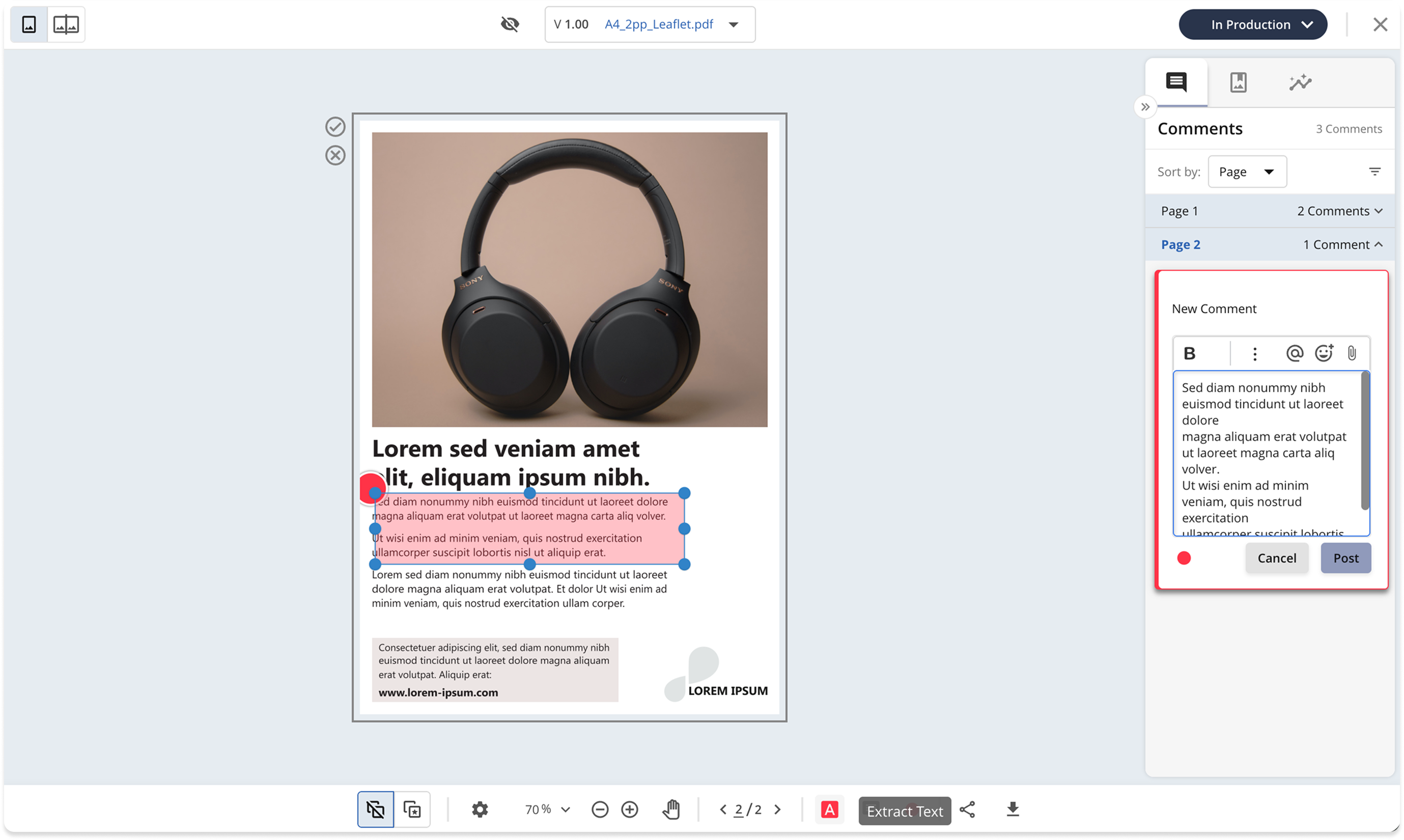
We are expanding the annotation tools in Proofing by adding Extract Text. It allows users to easily select a text excerpt by creating a box on top of the desired area, and extract the content to the proofing comment with a single click.
New Controls
Document Proofing: We added a toggle to control when technical layers are displayed.
Hide Technical Layers (Default/Recommended): Ensures colour accuracy by showing only the final output and hiding print production marks.
Show Technical Layers: Displays all layers and print marks for inspection, though colour accuracy may be reduced.
Video Proofing: We added support for zooming in and out on video files. It works by pressing Ctrl/Cmd + mouse wheel or using the laptop trackpad.
Time Management (Hours App)
Record Time callout
The enhanced Time Logging experience provides a more intuitive, streamlined, and flexible way to record and manage your work hours. Whether you are entering time manually, reviewing previous entries, or using the built-in timer, the updated interface is designed to help you track your work more efficiently and with less friction.
You’ll notice a clearer layout, improved navigation, consistent timer controls across all views, and new configuration options that let your workspace define how time entry actions behave. These improvements ensure that logging time is faster, more accurate, and easier to manage.
Key Updates to Time Logging:
The Record Time callout now provides a more comprehensive view of work. When opened from an item, the filters are automatically configured to display all time entries associated with that item, moving away from the previous default of only showing the current day's entries.
Additionally, it now displays time entries from all users (subject to Access Rights permissions), instead of being limited to only those created by the current user. This enhancement ensures users have a more accurate and complete overview of the total work recorded for the item.
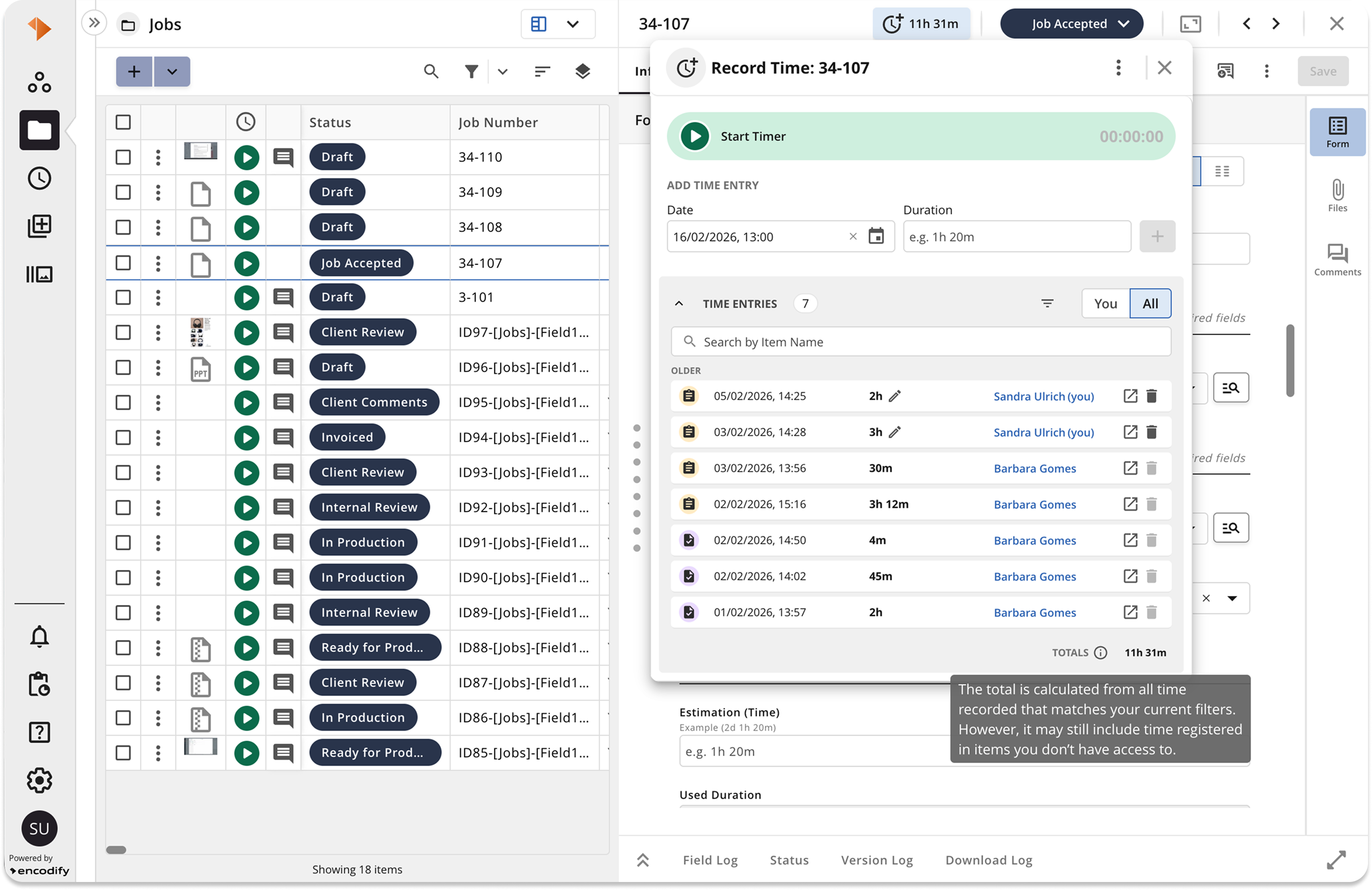
All time entries from the parent and current item in the Record Time callout.
Record Time in Hours App configuration
The new Record Time tab in the Hours App offers more flexibility to the behaviour when registering time directly from items. Administrators can customise the default behaviour of Add Time Entry and Start Timer, controlling whether the form opens immediately or if time is recorded instantly, bypassing the form. They also control module-level access. The default setting is to always open the form. By default, Add Time Entry is available at all module levels, while Start Timer is restricted to the Task level.
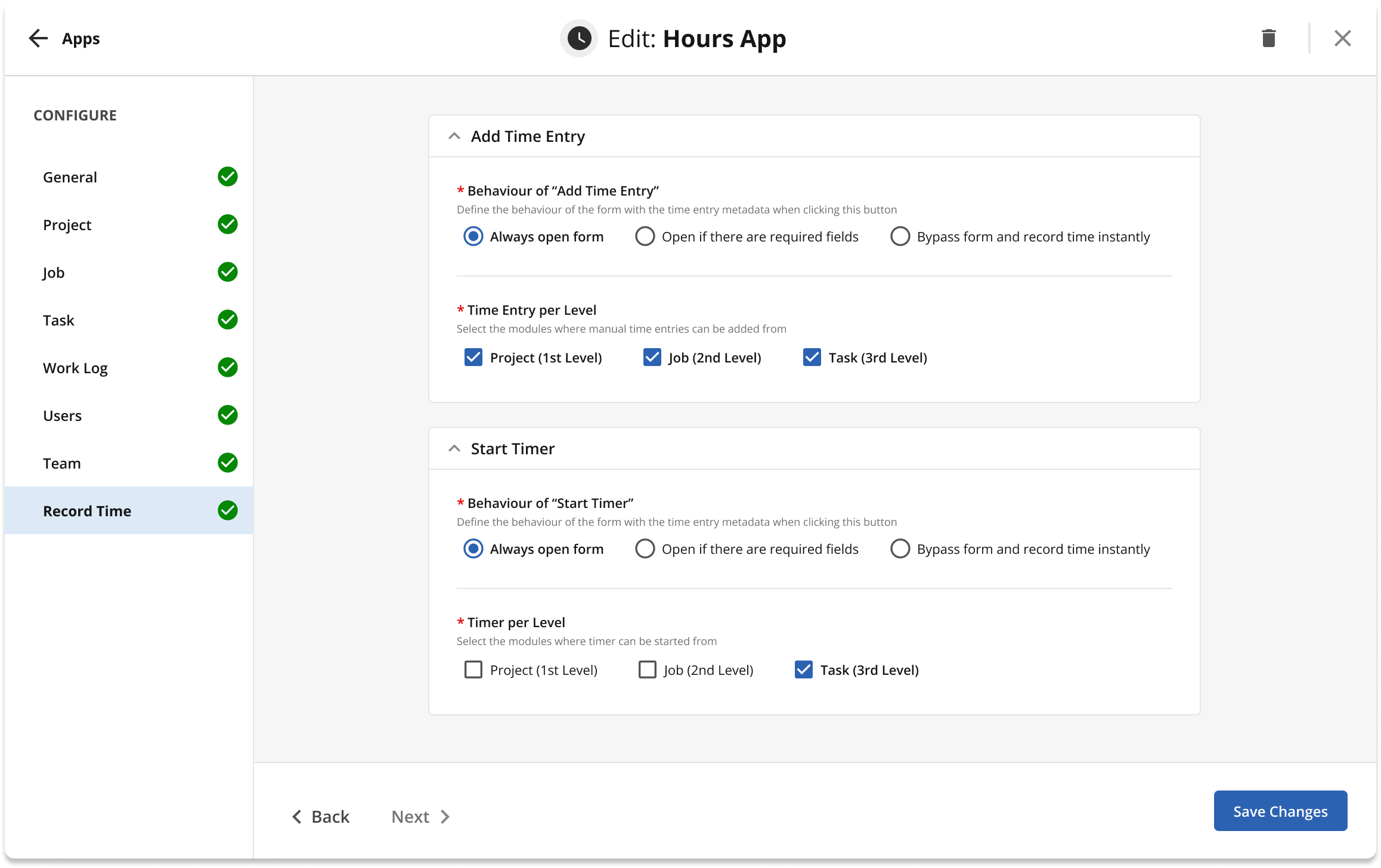 New properties to configure the behaviour when adding time entries and starting the timer, when recording time.
Workflow
Require Item Form in Valid State:
This new setting is a specific property that allows changing form validation behaviour. When enabled, it enforces validation, keeping the Status Change button inactive when the form is invalid. This applies to several interfaces, including Item Info Form, Item Split View, Item Modal, Menu Element Wizards, and CAS Print. Regardless of this setting, standard validation is always enforced for "dirty" forms (forms with unsaved changes) to prevent data loss during a status transition.
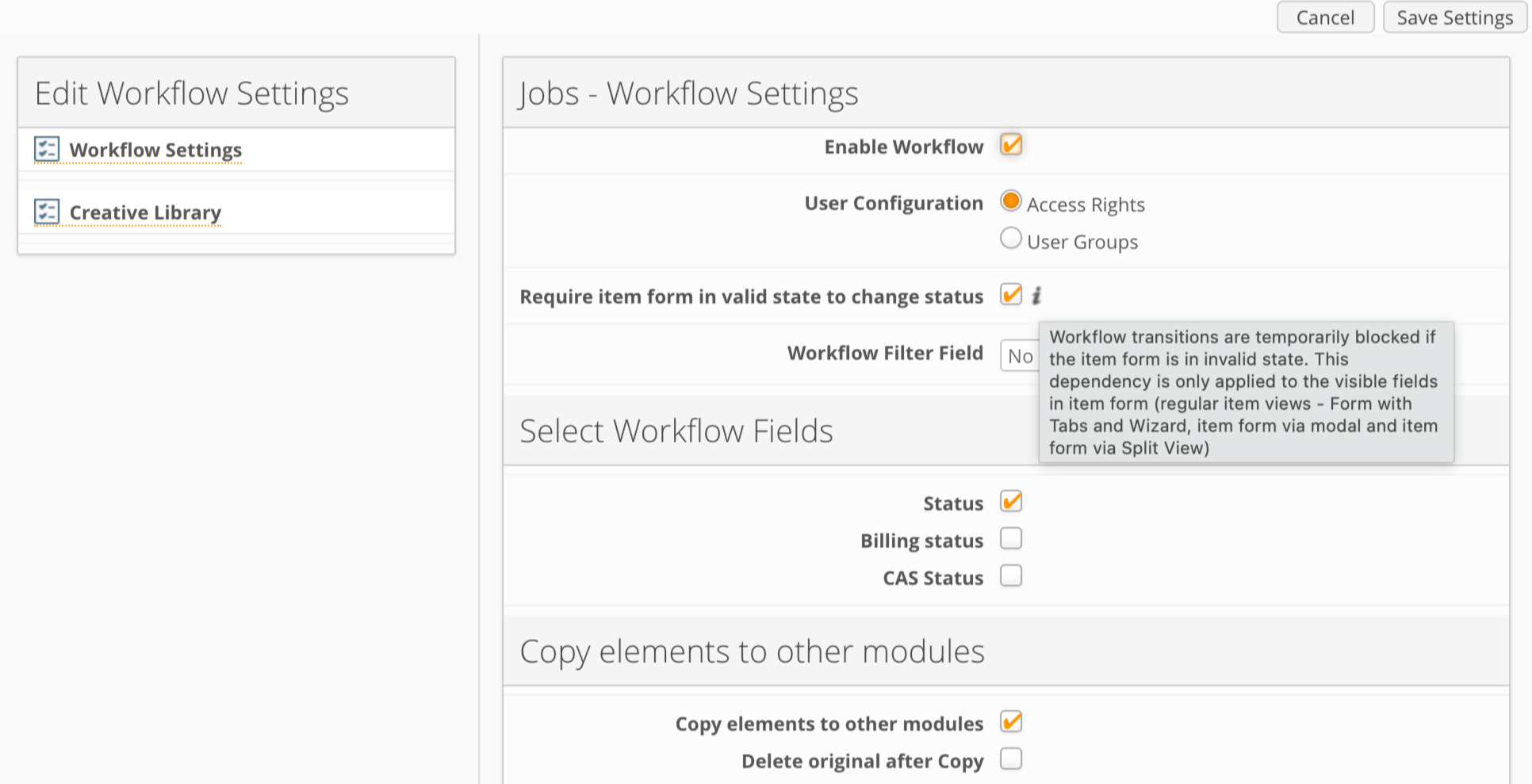
Migration Logic and Configuration: The state of this new property is determined by your existing workflow settings and migration status.
The following table describes how the property is set based on your workflow configuration:
Scenario | Workflow Status | Property State |
Pre-Migration | ON | ON |
Pre-Migration | OFF | OFF |
Post-Migration | Disabled (Set to OFF) | OFF |
Post-Migration | Enabled (Set to ON) | OFF |
Workspaces
Pivot Widget
Now supports the “Open Link in Pop-up” option for fields used in grouping, making navigation more intuitive in pivot widgets.
Performance Optimisation
Performance improvement for the Calendar Widget, especially with large datasets—rendering is now much faster and smoother.
Workspace loading times have been significantly improved, resulting in faster workspace switching and initial loads.
Improved timesheet loading speed. The Hours app only fetches the necessary user fields, eliminating timeouts and making timesheet loading much faster for all users.
Optimised how rules and user data are fetched and validated, reducing save times and improving responsiveness, especially for large user lists.
Automation rules search is now faster thanks to reduced payload size.
The "Update" and "Create items" buttons in bulk edit and bulk upload are now disabled during processing, preventing duplicate actions and improving reliability.
File indexing has been optimised to improve efficiency.
Breaking Changes
Removed configuration options only relevant to Classic UI, such as “Field Template for Search Results” and “Enable Automatic Search”. Review your module settings if you relied on these.
Some Notification Rules created in version 22.0.4 or later that use E-mail as a channel may require manual review and update, due to conflicting configuration between easy template and custom HTML. Please check your notification configurations to ensure they work as expected.
Support for proofing comments on Flash video formats (FLV, OGV, F4V, SWF) has been removed. Existing comments are now read-only, and new comments cannot be created for these file types.
When Review is enabled in Proofing, it is now mandatory to map a field in ‘Review Version Field’.
Fixes
UI & Usability
User List table no longer fetches data twice when clearing filters.
Select boxes in item view now display correctly in Classic UI.
Workspace widgets refresh icon is correctly disabled while loading.
Calendar widget “Fade events in the past” feature works as intended.
Fixed navigation arrows in CAS Split View that previously led to 404 errors.
Improved navigation between previous/next items when inline modules are expanded.
Fixed missing navigation buttons in Encodify Engage guides.
Fixed file field custom sorting not being respected in item view.
Clicking on a notification now takes you directly to the correct tab in item view with comments enabled, improving navigation and user experience.
Fixed an issue where a checkbox was incorrectly displayed next to text fields containing 6-digit numbers.
Improved text selection and appearance in the HTML body editor for notification rules, making it easier to copy and search text.
Fixed the text colour of values in the dropdown list of status fields when formatting rules are applied to the field.
Data, Import, and Integration
Importing modules with data now correctly sets the user context, avoiding errors.
Import no longer creates new values in status fields when existing options are available.
Inactive modules no longer show in the Guest Users App after the upgrade.
Modules with preconfigured file areas can now be created without errors.
Field usage updates with large numbers of fields and templates now work more reliably.
Fix to prevent unintentional deletion of files for cases where the current promotion version is restricted.
Fixed user filters to prevent cross-site and anonymised user IDs from appearing, ensuring only relevant users are shown in filters.
Fixed a startup issue caused by missing or broken file storage statistics, ensuring the system starts reliably.
Fixed an issue where the Hours app would not load for certain users due to incorrect access checks.
Fixed an issue where the "Unsaved Changes" modal could create additional items unintentionally.
Proofing
PDF preview issues in multi-proofing and random server errors have been resolved.
Deadlocks and duplicate requests in proofing endpoints have been fixed, improving reliability.
Annotation type display is now correct after switching between single and compare view modes.
Proofing UI no longer crashes on zoom due to invalid annotation dates.
Fixed an issue where empty annotations could be created and then disappear after a page refresh.
Resolved a bug where the annotation tool was not disabled on previous (read-only) file versions.
Fixed the style action button disappearing after switching between single and compare views.
Corrected the colour of annotation numbering in the comments panel.
Fixed the pan tool being disabled after multiple moves in Office docs proofing.
Fixed notification comments not being focused when opening proofing from notifications.
Fixed the annotation node outlines inheriting line style patterns incorrectly.
Fixed proofing preview generation for files migrated to Google Cloud Storage.
Changing annotation styles in proofing no longer creates empty comments or triggers errors.
The system now blocks batch comment creation for unsupported file types in proofing, ensuring only valid files can be commented on.
General Bug Fixes & Technical Debt
Modules no longer become inactive unexpectedly after config updates.
Deleting “Create New Item in Another Module (Ordering)” action now works.
Added validation for User Form Fields configured in Apps.
Fixed email notification rules to prevent conflicts between easy templates and custom HTML.
Copying widgets now creates new formatting rules instead of linking to existing ones, so widgets no longer unintentionally share formatting.
Fixed an issue where headers were cropped on card widgets with invalid URLs, so all widget headers display correctly.
The platform now prevents inactivation of modules that are still configured in Apps, reducing the risk of accidental disruptions.
Fixed a bug where using
fd0as a target field and key in action mappings would fail. Actions now trigger and update statuses as expected.