New Capabilities & Feature Improvements
Item Views & Proofing
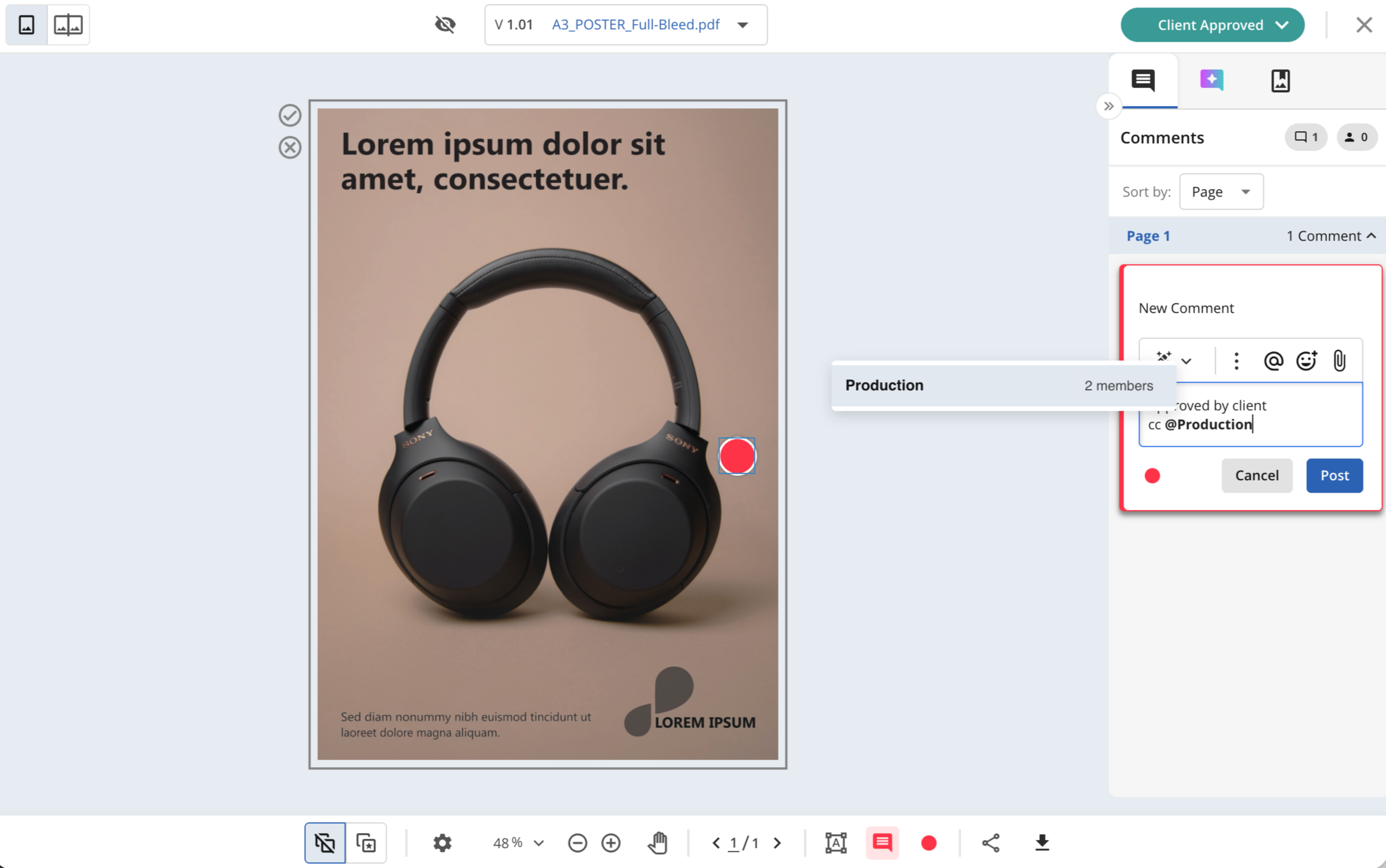
Mention and Notify Dynamic Teams
In June’ 26, we introduced a new way of gathering users: Dynamic Teams. Now these condition-based user groups can be used to mention users in bulk across the platform in item comments, proofing comments, and status change comments.
User Management
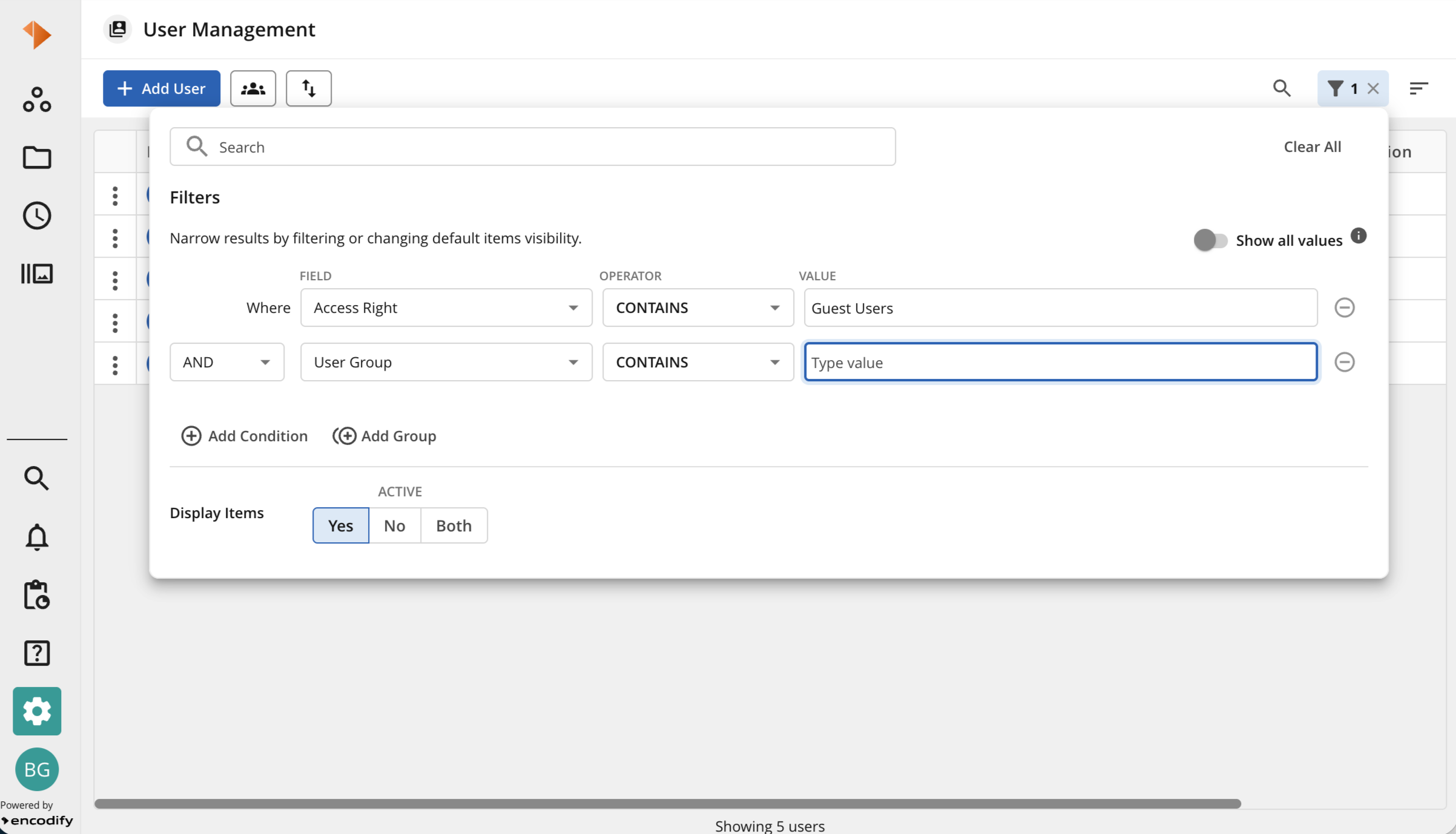
Filters
To enhance User Management at Encodify, we have expanded our filter capabilities to include Access Rights and User Groups—two critical user properties. Administrators can now easily locate specific users by selecting these entities within the Filter panel’s "Field" options and entering the desired search value. Additionally, filtering by Access Rights is now supported directly within the column header for added efficiency.
Manage Modules
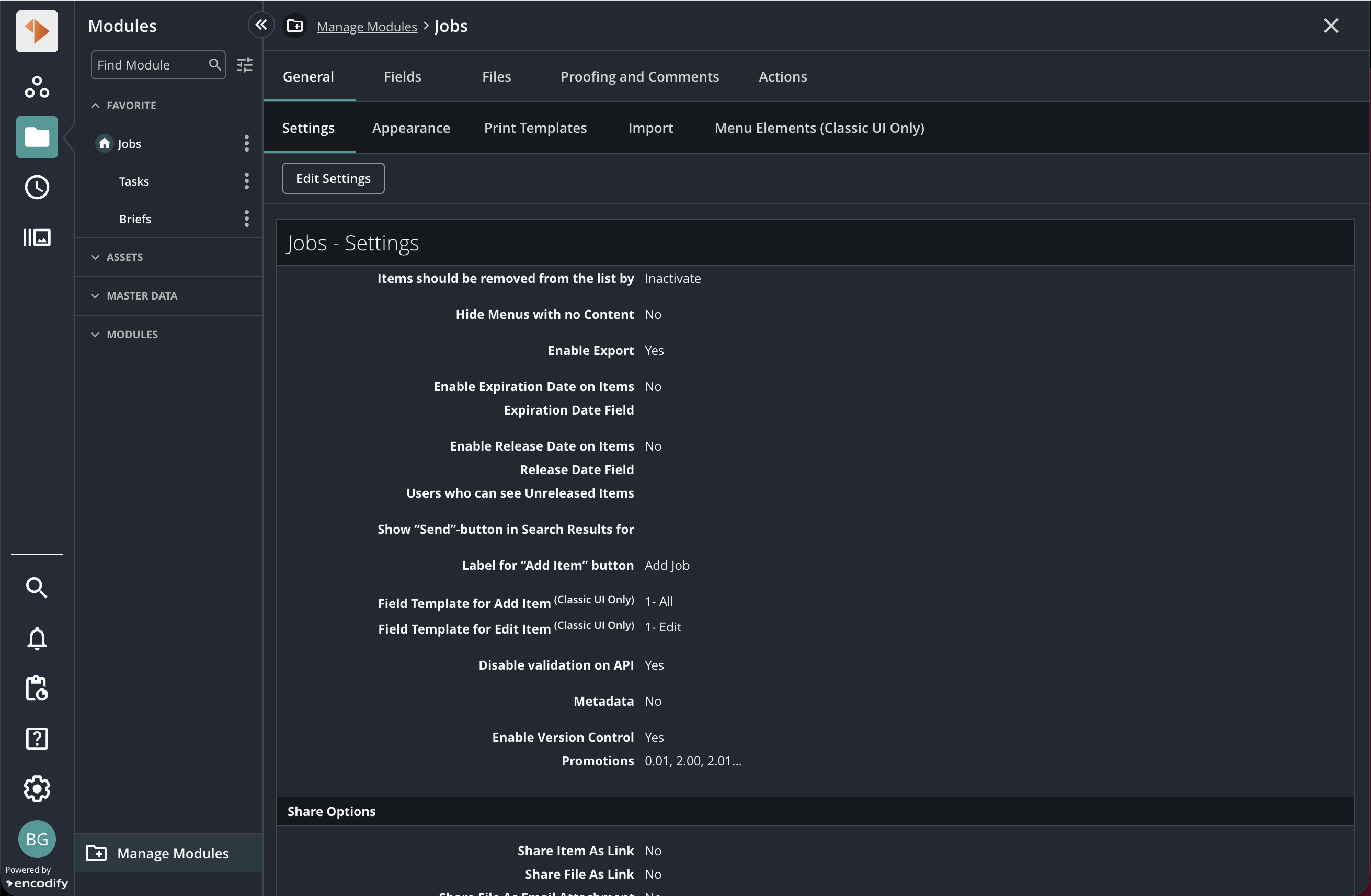
Module Configuration
We have relocated module configuration properties to the Manage Modules section. You can now access settings—including Appearance, Field Definitions, Media File Holders, Proofing, Comments, and Actions—directly from the module list within Manage Modules. The configuration properties themselves remain unchanged.
Please note
Current Access: While these properties are currently accessible via Site Configuration, they will be exclusive to Manage Modules in future updates.
Workflow Settings: These remain accessible only through Site Configuration for now, but are scheduled for relocation in upcoming releases.
Time Management (Time Tracking)
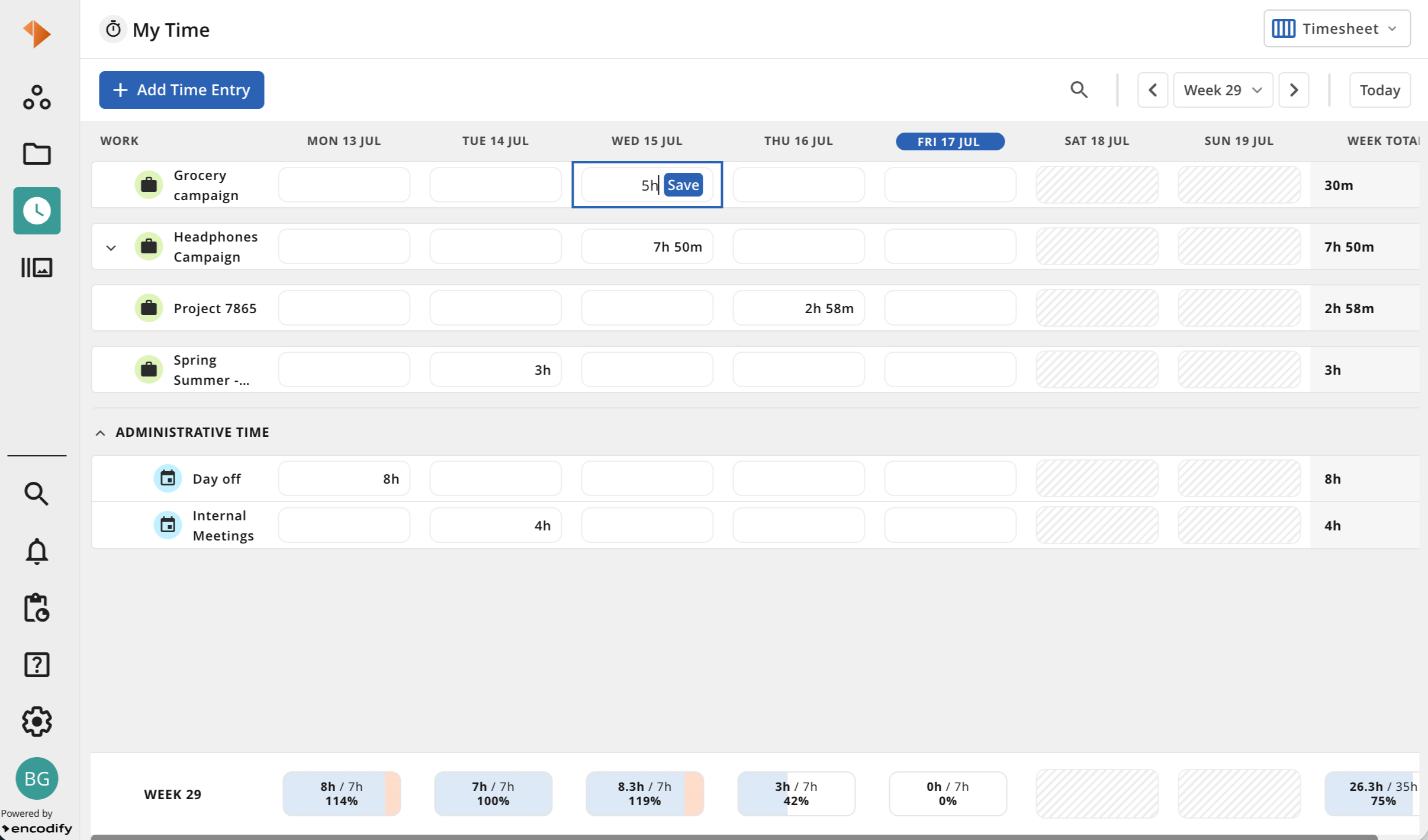
My Time > Timesheet
Streamline your Timesheet experience with new keyboard-based time entry. You can now navigate to any duration cell using the Tab or arrow keys and input your time directly. The cell will display the cumulative time logged for that item for the day. If you enter a value higher than the current total, a save button will appear, and the system will automatically create a new entry for the difference.
Example: If an item currently displays a total of 4h (based on entries of 0.5h, 2.5h, and 1h), entering 7h will generate a new 3h entry—the difference between your new total (7h) and the previous one (4h).
Breaking Changes
Decommissioned
Field Usage > Edit in Custom Edit
Removed the "Edit in Custom Edit" field security setting in Field Usage to unify editing access by replacing all uses with the "Edit in Edit" field security setting.
Please be aware: Following the removal of the “Edit in Custom Edit” and the substitution of all instances with “Edit in Edit” field security setting, the user's editing permissions per access right will be expanded. For instance, consider the “Test” Access Right where “Edit in Custom Edit” is enabled and “Edit” is disabled for the field “test field”.
Prior to migration: the user can edit “test field” in Briefing UI but is not permitted to modify that field in the standard module in New UI.
Post-migration: “Edit” is activated for “test field” - the user is now able to edit “test field” in Briefing UI as well as modify that field in the standard module in New UI.
Deprecated
Working Hours
The property "Working Hours" specified in the User Profile has been designated as deprecated in upcoming releases. This property will be replaced by a more thorough method of defining and calculating users' working hours for any given day. The new feature will take the place of the working hours in all existing instances where it is currently applied, particularly in the working hours and overtime calculations found in Time Tracking.
Further information regarding the discontinuation and substitution will be provided in future release notes and associated documentation. No immediate action is necessary at this time, and the feature will continue to be available until it is completely substituted. Please reach out to feedback@encodify.com with any questions or concerns.
Bug Fixes
Fix to ensure text calculation field formulas using nested functions are saved and evaluated correctly.
Adjustment of Automation Rules > Conditions, so the operators selector doesn’t get hidden when long strings are entered in the values field.
Fix for a UI freeze when pasting URLs into the search input. The fix keeps the UI responsive and allows the search API to manage special URL characters effectively.
Addressed an issue that prevented file fields from being automatically filled when new files are imported from Byggebasen via a connected service.
Updated the password requirements information displayed in the Change Password window to ensure the info reflects the actual strong password requirements.
Fixed the issue where work logs collapsed when search criteria matched a child item in the Timesheet view. Fixing this improves usability by showing relevant work log records expanded for easier review.
Mapped module link to parent is now respected when applying grouping to inline items.
Fixed the issue that prevented some modules’ data from being correctly exported.
Adjusted the dimensions of reference fields, so content can be fully displayed.
Work addressed validating the status of scheduled actions to prevent execution of disabled actions, ensuring proper processing control, and avoiding stagnation.
Fixed an issue where empty GCS file links prevented modules from loading after copying databases from one environment to another without files.
Fixed an issue where fields failed to pre-fill when creating items via the API. The solution standardised dependency handling for field import and API, ensuring dependent fields are populated correctly.
Repositioned proofing annotations numbering to ensure it is fully visible whenever the annotation is placed close to the document border.
Fix to address the correct redirect to the item after login when using item links.
Fixed a bug that would hide proofing markups from the artboard under certain edge conditions.
Fixed a concurrency issue where simultaneous operations overwrite user-group memberships silently, causing loss of group assignments.
Addressed the need to validate that the Milestone Field from Timeline 2.0 is not configured when its field definition is deleted, preventing configuration errors and ensuring data integrity.
Fix in “My Time” > “Calendar” to ensure the first day of the month is displayed as the first week of the grid.
Fix an issue that prevented the Workflow logs from being correctly displayed in the item view “Activity” tab if multiple Status Fields are configured.
Fixed an issue where video proofs occasionally displayed a black screen by applying a zoom adjustment to ensure correct rendering.