New Capabilities & Feature Improvements
Module Views
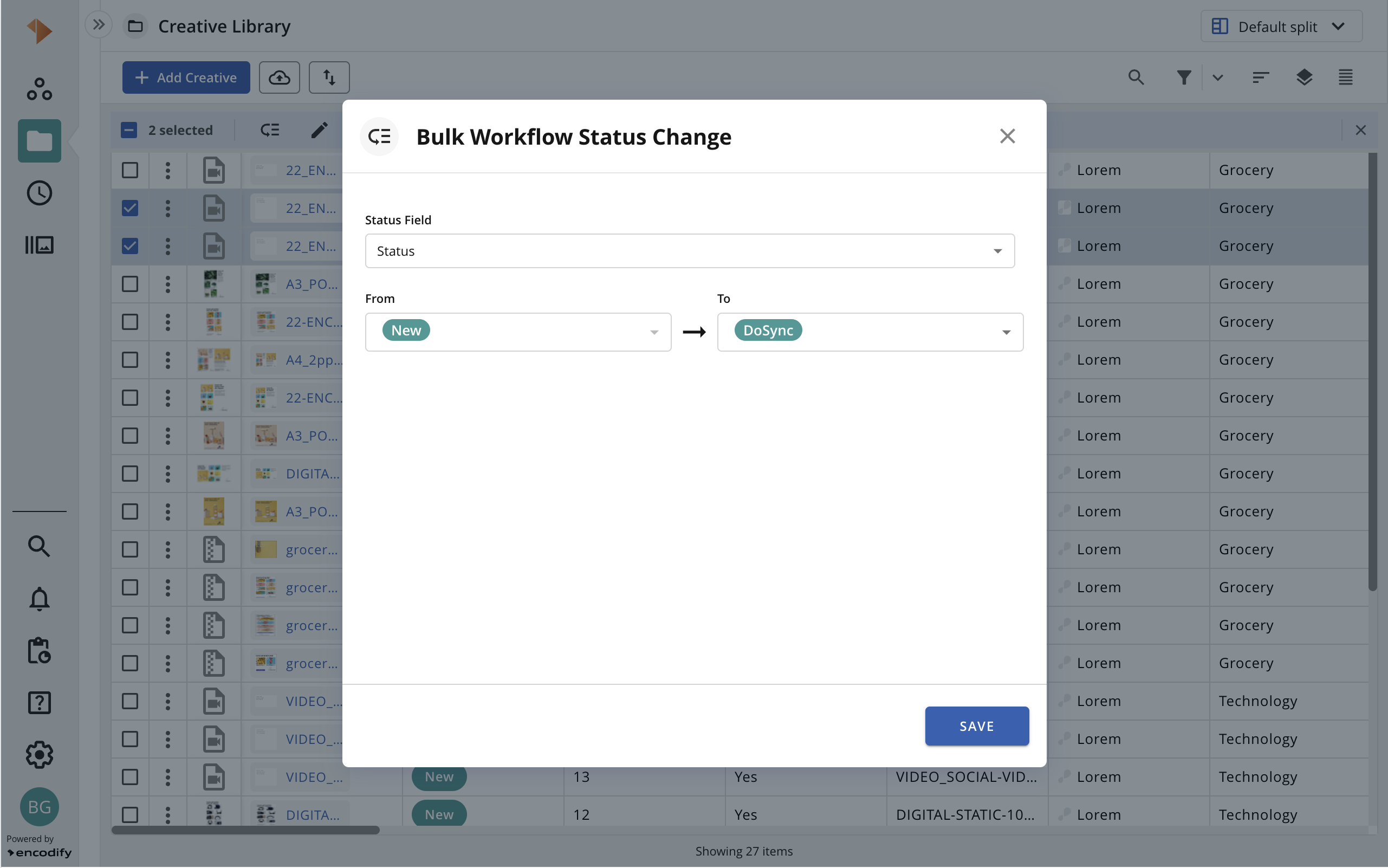
The process for bulk changing workflow status has been enhanced. Users can now utilise the bulk transition modal to modify status values across various status fields, as it enables them to choose which status field they wish to apply the bulk transition to. This update is consistent with the functionality of altering a single status value from the item action list, which previously permitted users to select a different status field when applicable. The default status field adheres to the order defined in Field Definition.
Form with Tabs & Wizard Form Configuration
Inline Modules: The layout of the inline modules section has been updated. Changes include the inline modules reordering element (Form with Tabs), disposition of the fields, among others.
Manage Modules
Site Data Model
The Site Data Model has now been integrated into the Manage Modules page and serves as an alternative to displaying modules in a list format. To view the connections between modules, the user needs to switch the display to Data Model. The same module filtering available previously can also be used on this page.
.png)
Custom Data Models
With the repositioning of Data Models to the Main UI, the creation of Custom Data Models has followed. From Manage Modules > Data Model > Custom Data Module, the user can view the existing custom data models and create new ones. The configuration properties remain the same, but the layout has been modernised for a better user experience.
Time Management
Administrative work should feel effortless and not distract users from what really matters, which is why we have been investing in making the Time Management tools in Encodify more suitable for the needs of everyday users. In this release, we introduce a new view and other improvements to the users’ time registration page, which is now called My Time, and a more advanced view for Line Managers to see their teams’ time entries, which is now called Team Time.
My Time
By accessing the Hours button in the side navigation, the user is presented with the My Time page, where their entries in different work types can be viewed as a Timesheet or a Calendar.
The calendar interface provides users with the ability to view their time logs at the precise moments the tasks were completed, to conveniently modify the start and finish times of their work directly within the calendar, to create new time entries by clicking and dragging on the calendar, along with additional functionalities. It is organised by colour according to the type of work, and it aggregates the totals by day over a week-long period, or weekly when viewed by month.
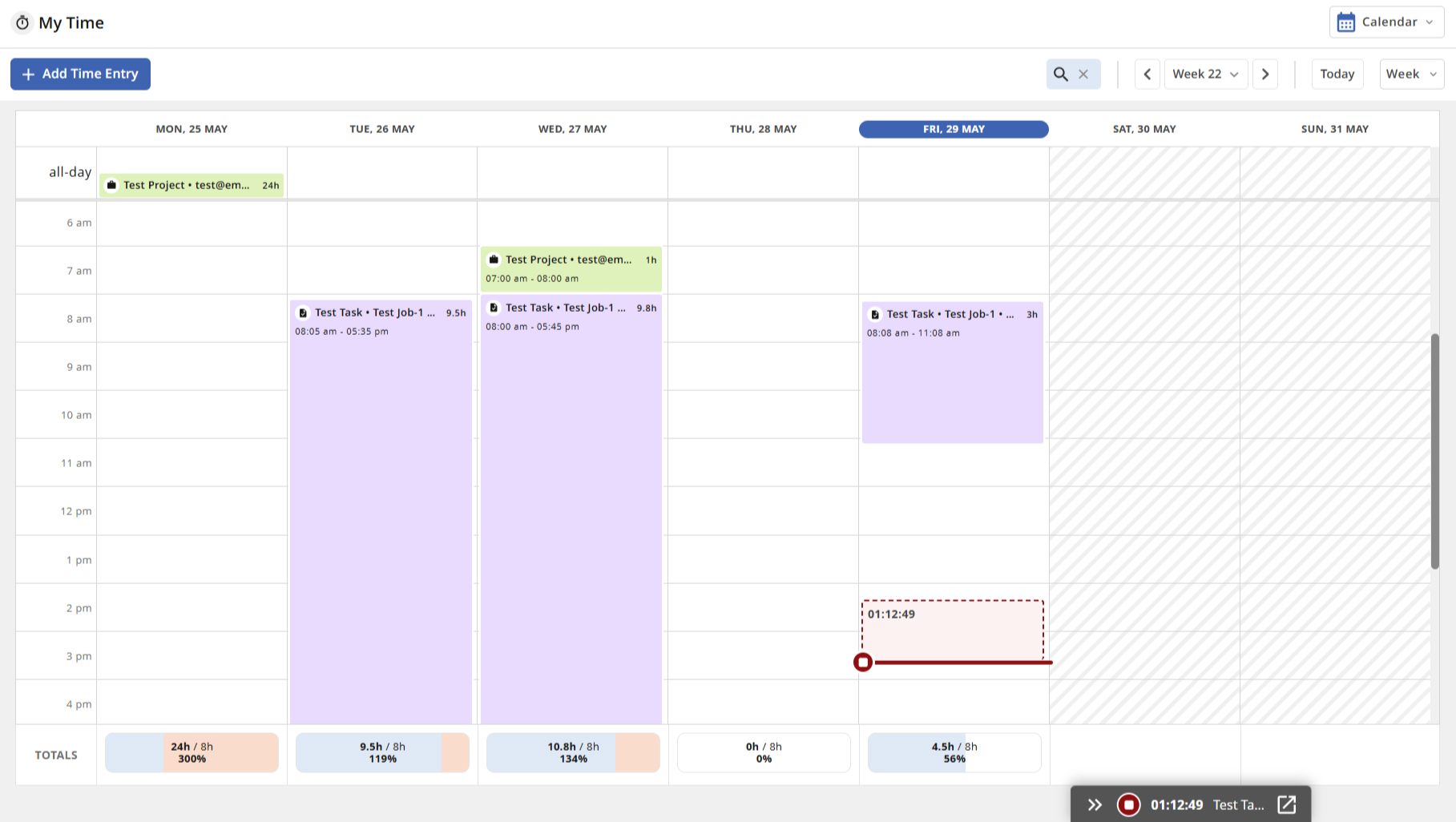
Check the documentation to understand how to benefit from this new way of visualising and managing the time recorded by users.Layout changes: The classic Timesheet view has undergone a layout transformation. It not only appears more contemporary, but it also provides a clearer and more accessible way to comprehend the tasks completed during the specified timeframe.
Uncategorized time entries: In the updated Timesheet view, users can also see if time has been logged in a work record that lacks, for one reason or another, one or more connections to the parent levels (Project, Job, and Task levels). This allows users to easily identify time entries that may require metadata adjustments and to account for worked time even when they do not adhere to the standard time-entry hierarchy. These time logs are compiled in the uncategorised row, which will appear below the standard Timesheet rows.
.png)
Check the documentation to understand all the changes and new capabilities the Timesheets can now offer.
Team Time
Compliance View
Line managers are now offered a fresh method of visualising the recorded work hours of their staff. The traditional Compliance view has been updated and enhanced to illustrate to managers where employees have logged their time during a specific timeframe.
.png)
Check the documentation to understand all the changes and new capabilities the Timesheets can now offer.
User Management
To enhance interaction and teamwork among groups of users, we are launching a new approach to assemble and engage them. The Dynamic Teams feature enables administrators to form teams based on specific conditions. This allows users to be gathered according to shared data - for instance, all individuals from the Marketing department located in Denmark - without requiring ongoing management, as the membership will be dictated by the established group criteria. This feature can be accessed on the User Management page, where teams can be initiated and overseen. In upcoming updates, Dynamic Teams will be utilised to mention a group of users in both item comments and proofing annotations.
Breaking Changes
Decommissioned
Cleanup of Corrupted User Groups - From now on, a UserGroup can no longer reference a missing/NULL or incorrect (non-existent) site.
Performance
Improvement of the performance and output quality for file conversion.
Bug Fixes
A fix ensuring that Kanban View swim-lanes are correctly loaded when a User field is selected as a grouping element.
Current user labels updated from "(Me)" to "(You)" across all functional areas, to improve clarity and consistency in user experience.
A fix ensuring the Background Jobs Queue panel updates the status of processes correctly while it is open.
Parent calculations are now correctly updated to reflect changes in children's items.
Fixed the error message that prevented the Active User List from loading successfully.
Increased the size limit (characters) of the value field in Filters in order to support longer search queries and prevent data truncation issues.
Addressed the bug causing page crashes when using the search on the Files → Converters → Media Files page.
Dropdown lists in Automation Rules and Timeline 2.0 filters were fixed and display all selectable values correctly.
Fixed the generation of PDFs from XSLT templates based on data from inactive items. Although the PDF generation no longer fails, the inactive item data will not be present in the PDF.
Module view filters now support large search strings without truncation, allowing users to save long search queries without errors.
Introduced a fix that guarantees that selection rules that use Reference Fields as conditions are correctly executed.
Fixed missing previews in Select Layout window in Web-to-Print (Adbuilder).
Fix to ensure the order of parameters in HTTP actions is respected and sent in the order they are added in the action configuration. This resolves the issue with populating fields’ default values when creating items via API.
Fixed the reset of reference fields' filter criteria in rules configuration.
Fix to ensure text calculation field formulas using nested functions are saved and evaluated correctly.
Proofing
Annotation markups are correctly displayed in the artwork corresponding to the version they refer to.
Fixed a bug that would hide proofing markups from the artboard under certain edge conditions.
Line breaks in proofing annotations are now considered changes in all annotation tools, so users can save notes when only line breaks are changed.
Fixed an error on palette colour selection for annotation tools in proofing.