Assign/Create User Groups Actions
Overview
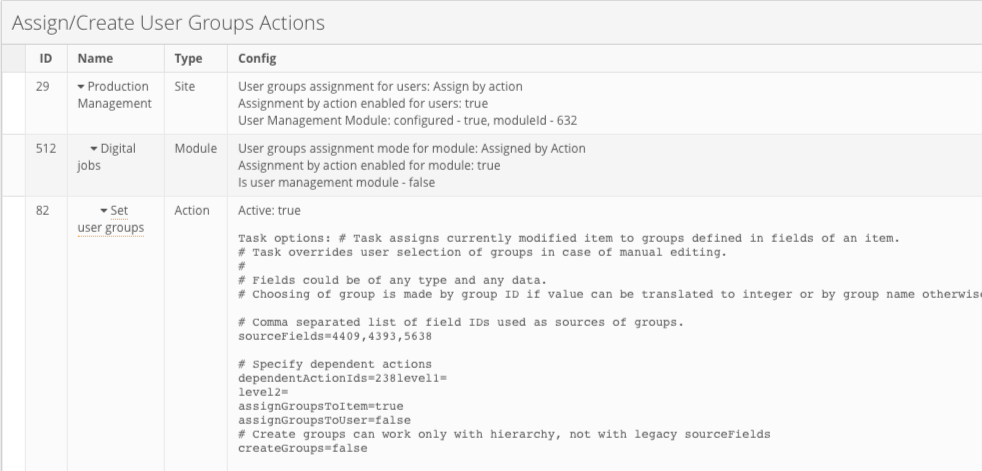
This Health page gives an overview of the user group settings and "Assign/Create User Groups" actions for a specific site.
Information Available
Group selection mode for the site (Manual or Assign by action)
User management module configured or not, listing module ID in case enabled
Module group settings, validating if "Assigned by Action" is enabled as group restriction type for the module
List of "Assign/Create User Groups" actions per module with configuration details
Validation when "Create/Assign" user group action is present in the module, but group restriction module is not "Assigned by action"
Validation is present when the create group property is enabled but level 1 is not specified
Validation is present if the module is UM and assignByAction is enabled in module config
Validation is present if the module is UM and assignByAction is not enabled in the user groups config
Validation is present if the module is UM and assignGroupsToItem=true in action config
Validation is present if the create/assign group action is present in a regular module and assignByAction is not enabled in module config
Validation is present if assignGroupsToUser=true in actions of a regular module
Navigation
Clicking the action link will open the action settings window in a new tab where it is possible to modify and save action properties.
Access Rights
The page is available only to users with site administration rights.
Compare User Groups and UM Options
Overview
The page will give an overview of the mismatch between the list of options representing the source of the user groups in the User Management module and the existing list of user groups.
.png)
Information Available
The check is only done for the User Management module against the fields mapped as the source of the user groups: text, option, module links.
The check will not work in case a flat user group structure is used in "Assign/Create User Groups" action(s). In other words, validation is done when the "level" parameter is used in action configuration.
When you use user name as the source for user groups in action settings, the check runs only against the list of active users.
The page does not check for the enabled or disabled "Assign/Create User Groups" action(s).
Fields Overview
Fields Overview page allows you to get an overview of all the field definitions and their configurations across all the modules within the site. Filters allow you to filter the list of field definitions by module, field type or both.
.png)
The module groups the list of field definitions. Clicking the field name allows navigation to the field definition configuration window.
Fields Overview health page will display information on the dependent fields if a field has any. This makes it easier to get an overview of the dependencies between the fields within a certain module.
In case cyclic dependencies are identified for the field, it will be displayed as a validation error.
.png)
Fields Overview health page will also display a warning on the module link fields where both "Prefill automatically" and "Default values" configurations are present.
Fields Convert
Fields Convert page allows you to convert some field types:
User fields to Module Link (Users);
Text Fields to Field Reference;
Module Link fields to Field Reference;
Integer fields to Field Reference;
Decimal fields to Field Reference;
Per cent fields to Field Reference;
Date fields to Field Reference;
URL fields to Field Reference;
Email fields to Field Reference;
.png)
.png)
Known Limitations:
It’s not possible to convert multi-module links or use it as a source currently in master;
App config becomes invalid after fields conversion - it is important to reconfigure the app before converting fields used in it;
Briefing config becomes invalid after fields conversion - it is important to reconfigure Briefing before converting fields used in it;
AdBuilder config becomes invalid after fields conversion - it is important to reconfigure AdBuilder before converting fields used in it;
Metadata Field from Proofing configuration becomes invalid after conversion - ‘Metadata Field’ cannot be converted to reference field;
If migration is done for module link - filter is converted from “oldModuleLink operator value”, to “sourceOfModuleLink operator value” (it’s expected that source always has equal values with old module link, otherwise, this conversion is incorrect, because data is removed from DB, and reference always shows data from source after migration);
Fixed text fields - not available for field reference fields and blocked during conversion;
Saved Filter might be nonfunctional after incompatible conversion. (Example: field was of type text, prefilled from module link. filter was “contains text”; after convert - it is transformed to reference to module link, and only available operators are “any of”).
Rules Overview
Rules Overview page is designed to give users configuring the system an overview of the rules based on date fields containing configuration that is no longer supported as a result of the implementation of the localisation feature.
The Rules Overview health page allows you to:
Get all the configured selection, validation and formatting rules across the modules within a site
Filter the list of rules to display only rules that need review and reconfiguration
Enter the rule configuration page by clicking the link
Export list of all the formatting rules for the current site
.png)
Rules Overview health page is not available if rules are not enabled in the System.properties file.
Access Rights
The page is available only to users with site administration rights.
Known Issues and Limitations
Be attentive to the leading and trailing whitespace in the names of the user groups. If you get the already "existing" user groups in the list of missing user groups, check the preceding and trailing whitespace in the name of the group and option name.