Example Business Case
Scenario 1
Applicable when fields: Start Date and End date is within months 03 to 08 (both included) and the Year is the same for both fields.
E.g. Start Date 1/3/2019 and End Date 28/5/2019.
System should automatically calculate the year and season as 2019, ‘Spring/Summer’.
Scenario 2
Applicable when fields: Start Date and End date is within months 09 to 02 (both included) year 2019-2020
E.g. Start Date 20/10/2019 and End Date 15/01/2020.
System should automatically calculate the year and the season as 2019, ‘Autumn/Winter’.
Scenario 3
Applicable when fields: Start Date and End Date falls between scenario 1 and scenario 2.
E.g. Start Date 1/12/2019 and End Date 1/03/2020.
User should be able to set the season and the year themselves - no season prefilling should take place.
Scenario 4
For specific company (e.g. Company = "Company_1"), their year goes from January to December, as opposite to March-February in scenarios 1, 2 or 3.
Data Model
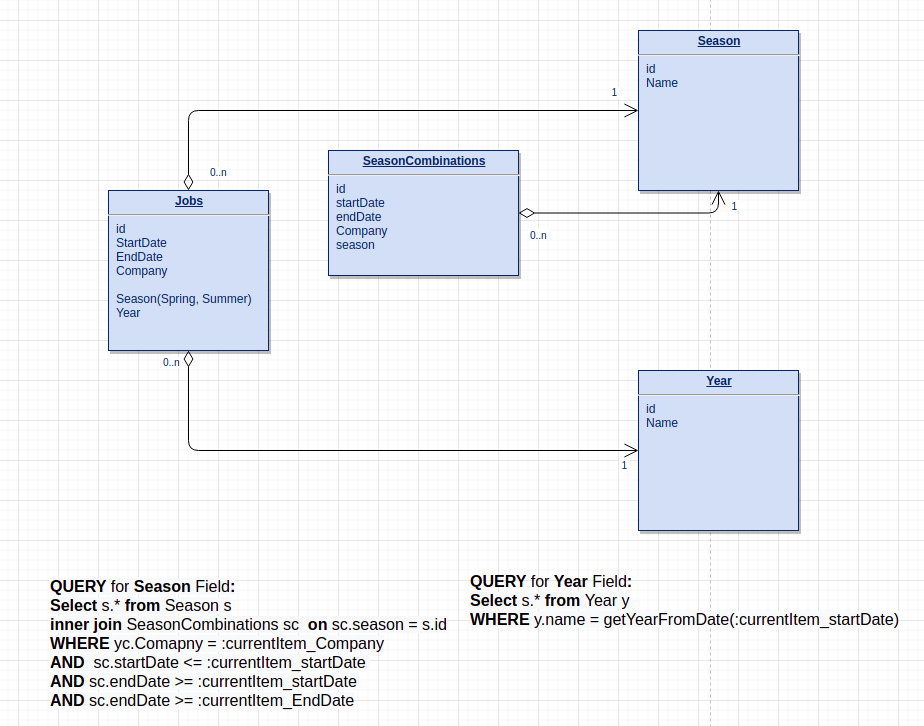
Query Examples
QUERY for Season field default values in module Campaigns:
Select * from MODULE_NAME_Seasons FD
inner join MODULE_NAME_SeasonCombinations sc on sc.FD_Name_Season = FD.id
WHERE sc.FD_4168 <= :currentItem_FD_1984
AND sc.FD_4169 >= :currentItem_FD_1984
AND sc.FD_4169 >= :currentItem_FD_1985
Where:
sc.FD_4168 is a Start Date field in module Season Combinations
sc.FD_4168 is an End Date field in module Season Combinations
:currentItem_FD_1984 is a Start Date field in module Campaigns
:currentItem_FD_1985 is a Start Date field in module Campaigns
QUERY for Season Field filtering in module Campaigns:
This configuration is required to filter the season by the company
Select * from MODULE_NAME_Seasons FD
inner join MODULE_NAME_SeasonCombinations sc on sc.FD_Name_Season = FD.id
WHERE sc.FD_4172 = :currentItem_FD_2439
Where:
sc.FD_4172 is Company module link field in Season Combinations module
:currentItem_FD_2439 is Company module link field in Campaigns module
QUERY for Season Field filtering in module Campaigns not allowing to select other season values excpet those that matches prefilling rule:
This configuration is required to filter the season by the company
Select * from MODULE_NAME_Seasons FD
inner join MODULE_NAME_SeasonCombinations sc on sc.FD_Name_Season = FD.id
WHERE sc.FD_4172 = :currentItem_FD_2439
AND
( ( sc.FD_4168 <= :currentItem_FD_1984 AND sc.FD_4169 >= :currentItem_FD_1984)
OR ( sc.FD_4168 <= :currentItem_FD_1985 AND sc.FD_4169 >= :currentItem_FD_1985)
OR ( sc.FD_4168 >= :currentItem_FD_1984 AND sc.FD_4169 <= :currentItem_FD_1985)
)
Where:
sc.FD_4172 is Company module link field in Season Combinations module
:currentItem_FD_2439 is Company module link field in Campaigns module
sc.FD_4168 is a Start Date field in module Season Combinations
sc.FD_4168 is an End Date field in module Season Combinations
:currentItem_FD_1984 is a Start Date field in module Campaigns
:currentItem_FD_1985 is a Start Date field in module Campaigns
QUERY for Year field default values in module Campaigns:
This configuration is required to extract the year from the Start and End date field values
Select * FROM MODULE_NAME_Year FD WHERE FD.FD_1864 = getYearFromDate(:currentItem_FD_1984)Where:
FD.FD_1864 is a Year field in the module Year
getYearFromDate(:currentItem_FD_1984) extraction of the year value from the Start Date field in the Campaigns module.
Example
Season Combinations module

Campaigns module
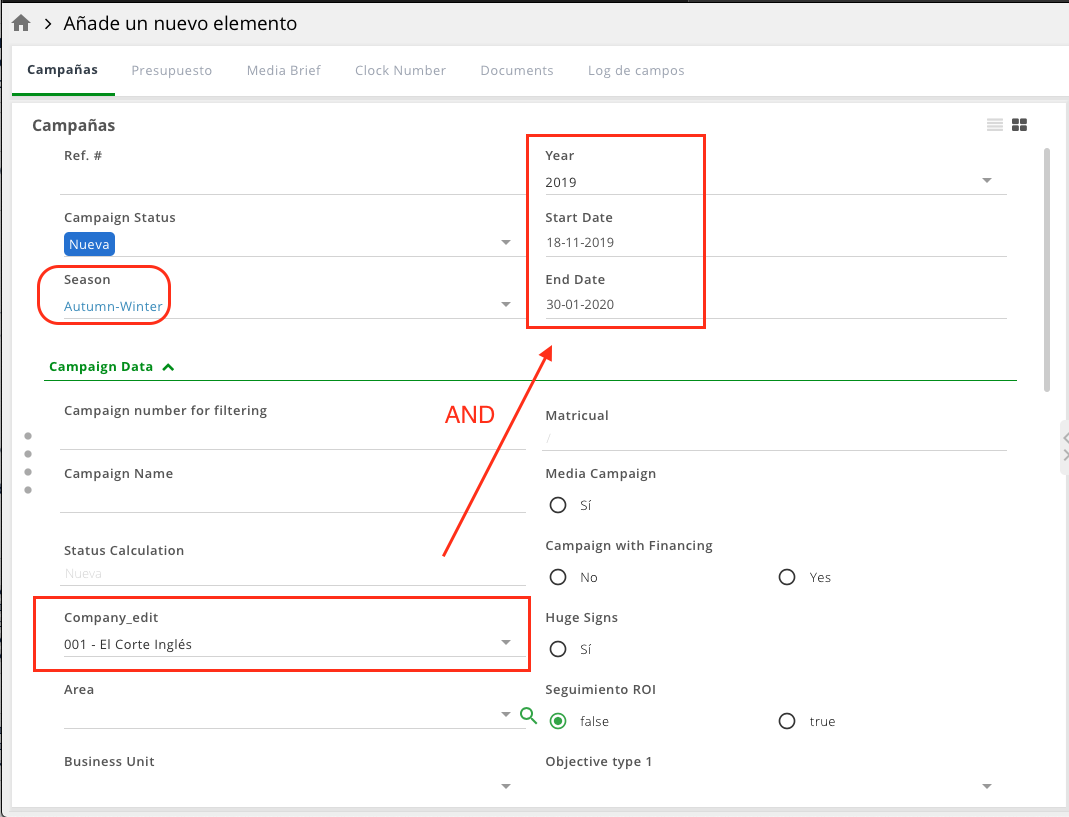
Configuration recommendations and limitations
Feature is for NEW UI only
For the start/end date the following field types are supported: Date, Date-Time, Month-Year, Week-Year, date calculation fields.
For the Year field in the Module Year fields of the type Text or Integer are supported.
Prefilling (also using DSL query) is not supported in item copy and API calls.
Prefilling will not take place in case value is restricted to a user (e.g by Group or Status settings).
Following existing prefilling behvaior of the system, in case more than 1 option matches the DSL Query, last option (by ID) will be prefilled.
Both module/field name and ID can be used in DSL Query. However, IDs are recommended for use to avoid problems with broken queries in case module/field is renamed or contains special characters or spaces.
Example:
Using module name
Select * from MODULE_NAME_Season FDUsing module ID
Select * from MODULE_123 FDUsing field name
WHERE sc.FD_Name_CompanyUsing field ID
WHERE sc.FD_123