Extending Permissions to Configure
By default, only site and system administrators have the necessary permissions to configure Apps from the library. However, access can be extended to specific user groups by modifying access rights.
Note on the Guest App: The Guest App is an exception. It is configurable only by site and system administrators, and its access rights cannot be configured or extended to specific user groups.
To modify access rights for all other apps, follow these steps::
Navigate to Site Configuration → User Settings → Access Rights
Locate the relevant access right and click Edit.
Select the checkboxes to grant READ and CONFIGURE permissions for the specific App.
Click OK to save and apply the changes.
Understanding the Permission Matrix
The permissions available in the access rights matrix define how users can interact with apps:
READ - Grants access to view the application on the dashboard.
CONFIGURE - Grants access to configure the app’s settings and functionality.
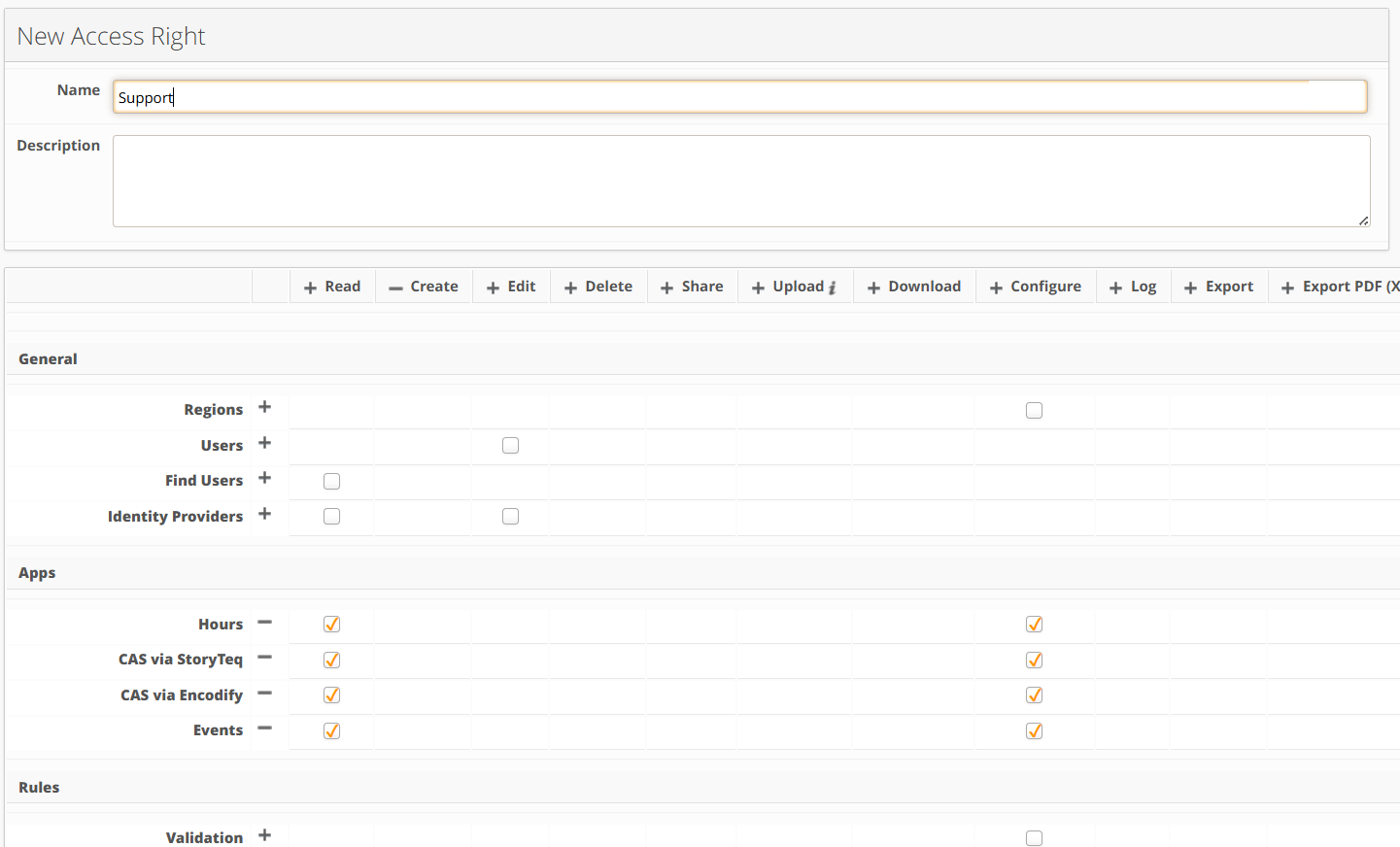
An image highlighting permissions granting access to configure apps