Site Data Model
Location: Home Page → Side Navigation Panel → Modules → Manage Modules → Data Model .png)
Site Data Model View
Site Data Model provides an overview of existing modules and the relationship between them.
For each module in the multi-select box, the graph shows all modules that are connected to the given module. If the source and target module have multiple links, they are split by a pipe ( | ) and combined in a single edge.
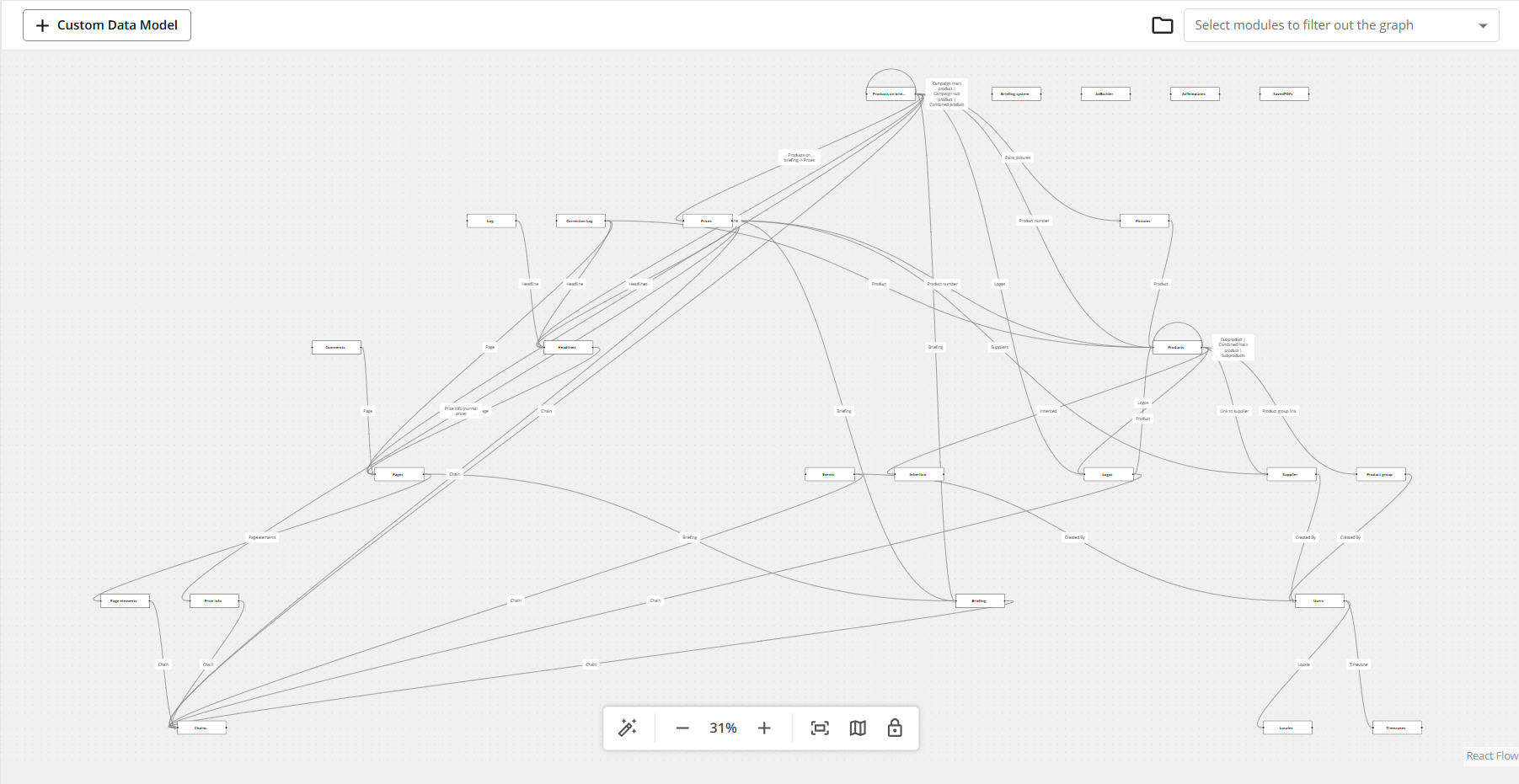
Fig.1.: Site Data Model default view ( no filters applied )
Terminology
Term: | Definition: |
|---|---|
Vertex or vertices | Module or modules in the graph |
Edge | A line connecting 2 modules displaying their relationship, in other words, module links connecting 2 modules. |
Pipe | Used inside the edge to separate multiple links ( | ) |
Understanding the View
The table below provides a quick overview of the Data Model.
Action | Visual Guide |
|
|
|
|
|
|
|
|
|
|
|
|
|
|
|
|
|
|
.png)
.png)



.png)
.png)
Logic and Rules
Some vertices cannot be connected (if there is no link between vertices)
The data model will display only active modules
Available only to users with system admin or site admin access
Module names and field definitions respect current user language
Known limitations:
Edges overlap for cases when module has multiple module links