Overview
The AI Summary feature provides users with an intelligent, condensed overview of discussions, feedback, and reactions within proofing comments. It is designed to enhance content digestion, especially for lengthy threads or media-heavy files (PDFs, Videos, and Audio).
Note: This functionality is strictly controlled by a Feature Flag. It is currently not available on the Multi-file Proofing page.
User Interface & Navigation
Access Points
Proofing Sidebar: A dedicated "Summary" tab is available during proofing.
Icon States: The tab icon appears in Gradient (colourful)
.png) when inactive and switches to Standard Grey
when inactive and switches to Standard Grey  when active.
Sub-navigation: Clicking the button/tab navigates the user directly to the Summary sub-view.
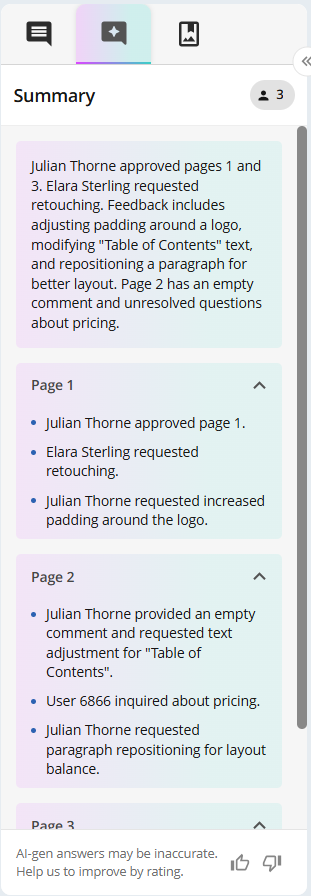
Summary sub-view
Loading & Generation
Upon activation, the system enters a loading state displaying the message: "Generating Summary of Comments...".
Permissions: The summary considers only comments and replies that the specific user is permitted to view.
Filter Independence: The AI generates the summary based on the total available comments; it does not consider active UI filters.
Generation: The summary is not stored, and therefore is unique. That means every time the user accesses the Summary tab, a new summary is generated, considering the data included at that moment.
Summary Content & Structure
The summary is presented in two distinct blocks to balance brevity with detail:
General Summary: A high-level overview of the conversation.
Detailed Summary: An expandable section providing granular points.
Media-Specific Grouping:
PDFs: Summaries are sectioned by Page.
Videos/Audio: Summaries are sectioned by Timestamp.
Images: Generally treated as single-page summaries.
Voting & Feedback
Every summary includes a footer for quality control:
Disclaimer: "AI-gen answers may be inaccurate. Help us to improve by rating."
Rating System: Thumbs up/down icons to collect user sentiment on summary accuracy.
Insights
The AI logic incorporates the following metadata to weight the summary:
Feature | Logic & Impact on Summary |
Comment Status | Comments are "Unresolved" by default. Marking as "Resolved" communicates changes but does not block workflow. |
Reactions | Fixed emojis express perceptions. "Request to Stop" and "Have questions" reactions are prioritised in the summary. |
Page Status(PDF only) | "Approved" or "Rejected" statuses are recorded. "Rejected" pages typically trigger a summary focus on the justifying comments. |
Localisation & Translation Rules
The output language matches the user's system settings. However, the AI is instructed not to translate the following "Protected Data":
Text contained within quotation marks.
Proper Names.
Email addresses and Website URLs.
Known Behaviours & Limitations
Users should be aware of the following current limitations:
Error Handling: If the API fails, a specific error view will appear with a "Generate Summary" button to retry.
Attribution Errors: The AI currently attributes summaries to the original creator of a comment, ignoring "Updated By" metadata.
Entity Misattribution: Occasionally, a request in a thread may be incorrectly linked to the original poster rather than the replier.
Sensitive Data: AI does not redact sensitive information; if it is in the comments, it may appear in the summary.
Attachment Logic: The AI reports the presence of attachments based on text intent/hints rather than verifying actual file metadata.
Technical Constraints: Annotation tools (drawings, highlights) are not distinguished.
Incorrect Emoji Mapping: A known discrepancy exists in how the AI interprets emoji intent. The system may incorrectly map or describe an emoji's meaning within the summary text.
Hallucinations: Infrequent "hallucinations" regarding timestamps or page sections may occur in media-heavy files.