What are Status Settings
Location: Modules > Manage Modules > {Module} > Module Configuration > Fields > Status Access Settings
Status Settings provide granular permissions and access controls, enabling you to define which access rights or user groups have READ, EDIT, UPLOAD, or ORDER capabilities when an item reaches a specific stage in the workflow. For example, you might disable the ability to EDIT once the workflow reaches the status ‘Closed’.
.png)
How to configure Status Settings
To enable Status Settings, follow these steps:
Navigate to Modules > Manage Modules > {Module} > Module Configuration > Fields
Click the Status Settings tab
Click Edit Status Settings.
Locate the option Enable Status and ensure the checkbox is ticked.
Tick the checkbox for the associated status field to which you want to apply access controls.
Click OK to apply the changes.
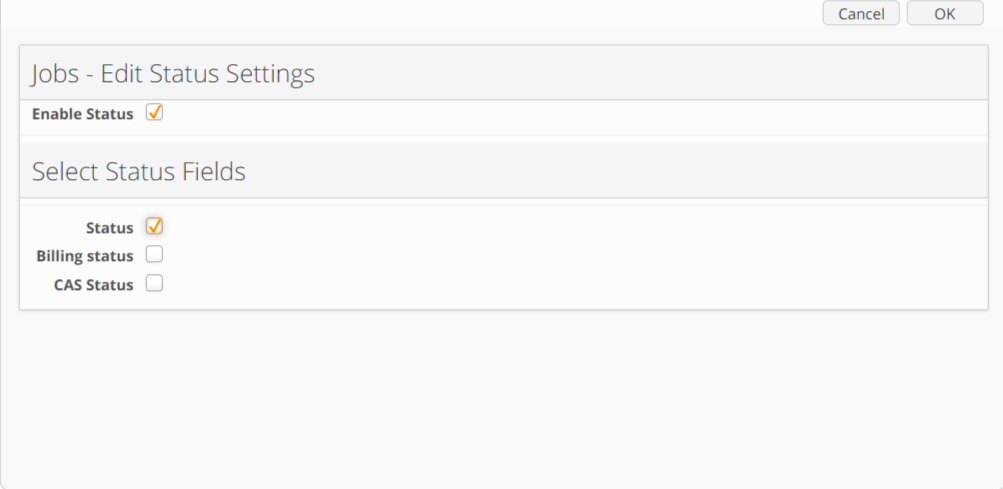
Image displaying Status Setting modal
Once enabled, you can define access permissions for all access rights or user groups, which regulate access to items in their respective states. The following permissions can be set:
Permission | Description |
Read | This grants the user the right to see the content of the module |
Edit | This will allow the user to edit the content of the module |
Upload | Controls "create" item access in combination with "Read" access. |
Order | This access right is applicable only to the Ordering feature and allows the user to see the Order button in the catalogue module item. |
To define the permissions against a specific status value, follow the steps below:
Click the
 Edit icon
Tick the checkbox for each access right to grant READ, UPLOAD, EDIT or ORDER permissions.
Click OK to apply the changes and repeat for each status value
.png)
View Mode: highlighting granular permissions assigned to each access right
Status Field – Type-Specific Behaviour
Access restrictions based on a status field are currently supported for two field types:
Option field
Module link field
The access control rules differ depending on the field type, particularly when the status field has no value:
Option field:
If the status field is empty, the item remains unrestricted and is visible to all users.Module link field:
If the status field is empty, the item is restricted and not visible until a specific value is assigned and the corresponding restrictions are applied.